Inter-Warehouse Transfer
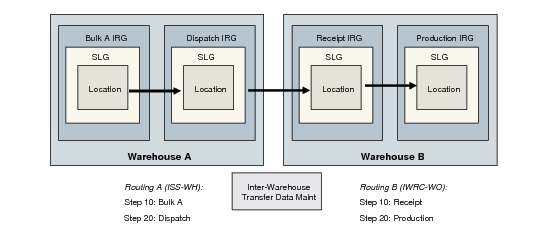
An inter-warehouse transfer is processed using a sequence of internal routings, the same as other warehouse transactions. The key difference is that a movement between warehouses involves several transactions and the setup needs to reflect this.
Example: A transfer of 100 EA from warehouse A (raw materials) to warehouse B (production) requires the following internal routings.
1 An issue transaction in warehouse A:
• Transaction type: ISS-WH
• Internal routing: ISS-WH
• Step 10: Bulk
• Step 20: Dispatch
• Algorithm Assignment: Location Find
2 An inter-warehouse receipt transaction in warehouse B:
• Transaction type: IWRC-WH
• Internal routing: IWRC-WH
• Step 10: Receipt
• Step 20: Prod
• Algorithm assignment: location-find and put-away
3 An inter-warehouse transfer transaction type:
• Transaction type ISRC-WH
• Internal routing
• Algorithm assignment
For sales order, work orders, and so on, you need to define a similar set of transaction types if the inventory movement involves an inter-warehouse transfer.
Example: For a work order you would need to create:
• PICK-WO for warehouse A
• ISRC-WO
• IWRC-WO for warehouse B
Inter-Warehouse Transfer Example summarizes the movement of 100 EA mentioned at the beginning of this section.
Inter-Warehouse Transfer Example