Defining Lanes and Docks
Use Lane Maintenance (4.15.1.1) to define a shipping lane or a dock.
A shipping lane and a dock are locations. Typically shipping lanes are locations to which staff bring all boxes for an order, customer, or carrier. Docks are locations where staff load the boxes onto trucks. The loading dock includes various components, including platforms where goods are stacked, ramps for truck loading, and so on. Shipping lanes and docks can also be dedicated areas where you process orders in a specific way; for example, for a specific carrier type. The system considers shipping lanes and docks when it processes orders for a wave.
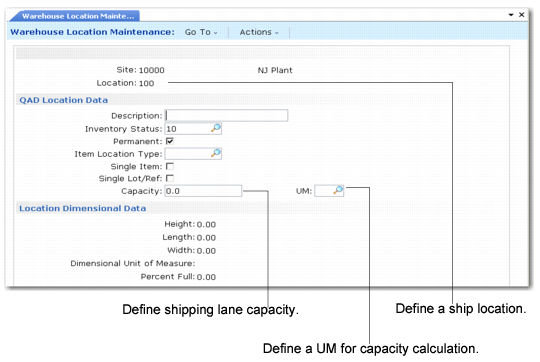
Before you define a shipping lane or a dock, you must set them up as locations in Warehouse Location Maintenance (4.3.13). For shipping lanes, you also specify the capacity in Location Maintenance.
Warehouse Location Maintenance (4.3.13), Shipping Lane shows a shipping lane defined as a location.
Warehouse Location Maintenance (4.3.13), Shipping Lane
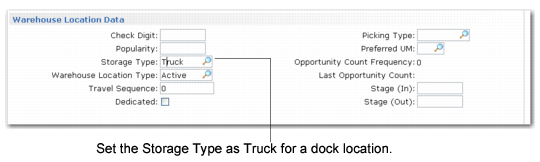
Docks are typically in a functional IRG and do not require capacity specifications. In Warehouse Location Maintenance, you should define the Storage Type for the dock as Truck; see
Warehouse Location Maintenance (4.3.13), Storage Type Field.
Warehouse Location Maintenance (4.3.13), Storage Type Field
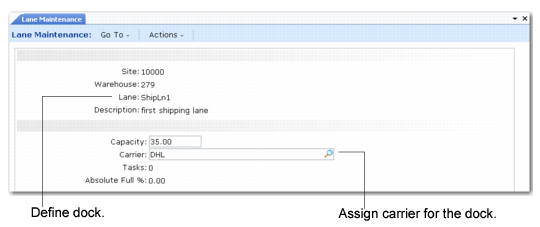
Lane Maintenance (4.15.1.1), Dock Setup shows a dock set up in Lane Maintenance (4.15.1.1). You can assign a specific carrier to a lane or dock. In the setup shown in
Lane Maintenance (4.15.1.1), Dock Setup, a carrier is assigned to the dock. You specify the carrier in the Carrier field.
Lane Maintenance (4.15.1.1), Dock Setup
Site
Enter the site for the shipping lane.
Warehouse
Enter the warehouse for the shipping lane.
Lane
Enter a location previously defined in Location Maintenance that represents this shipping lane.
Description
Enter a brief description (maximum 24 characters) of the shipping lane.
Use Lane Group Maintenance (4.15.1.5) to group several shipping lanes together.
Capacity
Enter the capacity of this shipping lane, in terms of the dimensional unit of measure specified for the lane in Warehouse Location Maintenance (4.3.13). See
Warehouse Location Maintenance (4.3.13), Shipping Lane.
Carrier
Specify the carrier for this shipping lane. Specify multiple carriers with a comma-separated list.
Number of Open Tasks
This field is display only and indicates the open, existing tasks for the shipping lane.
ABS Full %
The system displays the absolute full percentage of the location. An absolute % is a count of the exact content of that location. In the Location Full % Report (4.3.17.13), the system displays a relative percentage that considers an empty location as 0 % and a location containing any items, regardless of the quantity, as 100%.
The absolute full % also displays in Warehouse Location Maintenance (4.3.13).