QAD 2017 Enterprise Edition
>
User Guides
>
Warehousing
>
Wave Planning
>
Closing the Wave
Closing the Wave
Use Wave Close (4.15.17) to close a wave. You can only close a wave when both replenishment and release are complete and no tasks exist for the wave.
Closing a wave is important since an order line can only be in one wave at a time for sales and distribution orders. If the system does not process an order line in a wave, you can close the wave so you can add the line to another wave.
Wave Status Inquiry (4.15.4.3) displays all open waves. When numerous waves exist in the system, the report can be difficult to read. For reporting efficiency, you should close waves.
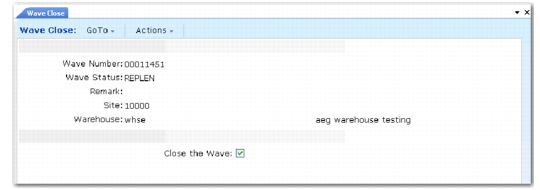
Wave Close (4.15.17) shows the Wave Close screen.
Wave Close (4.15.17)
Wave Number
Enter a number for the wave you want to close. The system display the wave status and site, warehouse, and remarks specified when the wave was created in Wave Selection.
Close the Wave
Indicate whether to close the wave.
No: Do not close this wave.
Yes: Close this wave.
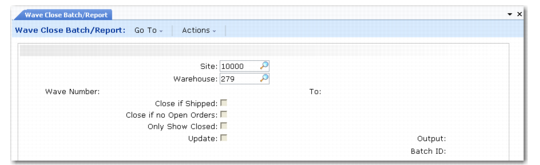
You can also close a wave when reporting using Wave Close Batch/Report; see
Wave Close Batch/Report (4.15.18). You can use the report to close a batch of waves or a single wave. You can specify to close waves that have:
• Orders that shipped
• No open orders
Enter Yes in the Update field to close the waves.
Wave Close Batch/Report (4.15.18)