QAD 2017 Enterprise Edition
>
User Guides
>
Warehousing
>
TMS Interface
>
Features
Features
QAD Warehousing works with a TMS to provide the following:
• Check carrier rates and routing guide for best cost, lead time, or delivery window
• Perform order consolidation, route optimization, and drop off sequencing
• Perform compliance checks if defined
• Produce native carrier or packing labels
The following topics discuss features in QAD Warehousing that let you interface with a TMS.
Wave Planning, Replenishment, and Release
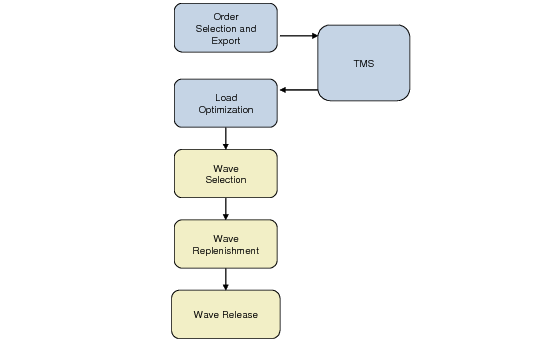
When using QAD Warehousing wave planning functions, the system relies on workload capacity constraints for planning warehouse picking, packing, and shipping activities. The system uses a TMS to consider load consolidation and optimization
during wave planning. The TMS factors in different modes of available shipping such as parcel shipping, less than truckload (LTL), and full truck load (FTL) when selecting orders for a wave. See
Wave Planning with a TMS.
During wave replenishment and release, the system creates picking tasks and groups them for pre-shippers per ship-to address. Load optimization functions within wave planning let you:
• Import TMS load optimization information to produce more efficient task groups for pre-shippers
• Organize task groups to optimize picking, packing, and shipping of loads by similar means of transport.
• Execute checking against waves lines and quantities
• Drive the replenishment and release processes
The relationship between waves and loads is many to one.
Wave Planning with a TMS
Order Selection and Export
As a step to using a wave planning flow with a TMS, the system flags order lines to either follow a load optimization flow or follow the original wave planning flow. The system selects orders flagged for load optimization and exports them to a TMS before making them eligible for selection in a wave. You can export all or a subset of the selected sales or distribution order lines for TMS processing.
QAD Warehousing exports a detailed list to a TMS of sales/distribution order lines, quantities, weights, and volumes that you want to optimize and consolidate to streamline shipping. The TMS performs calculations to optimize the load, then sends the optimized information back to QAD Warehousing.
You can set up load optimization parameters in Load Optimization Set Up Maint (4.15.2.1)
Batch Picking and RF Options
Batch picking and other RF options are linked to the TMS; see
Batch Picking with a TMS.
Batch Picking with a TMS
Although task confirmation and related activities are the same, the system enhances task orders that display on the RF to take advantage of load optimization.
Warehouse staff can no longer mix items belonging to different loads into the same container (tote, box, or pallet) when picking.
When building containers through the RF, the system ensures the containers cannot contain items from different loads in the same container.
Load Verify
QAD Warehousing performs load verification functions when it:
• Converts a pre-shipper to a shipper
• Prints the shipper and shipping labels
• Verifies all tasks for a given load have been completed
Print Paperwork, Container Move and Pallet Explosion
Container Move functionality uses TMS drop-off sequencing information to stage pallets in the right order, inverse to the drop-off sequence linked to each pre-shipper. That is, when loading containers that belong to a load, the system verifies that the containers belonging to pre-shippers with the last stop sequence are loaded first.
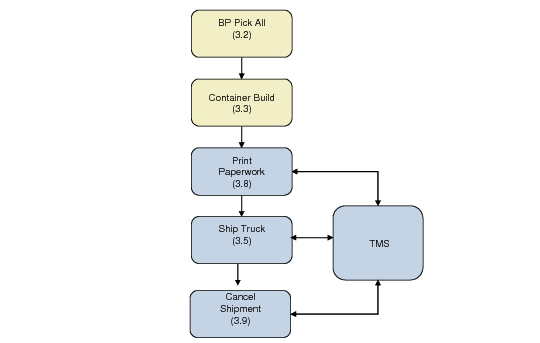
QAD Warehousing also sends packing information to the TMS so that the TMS can produce the appropriate shipping labels. During print paperwork functions, QAD Warehousing exports packing information to the TMS; the TMS, in turn, returns shipping labeling information or prints shipping labels.
The system produces all necessary documentation for individual shipments (manifesting), including cross-border transactions within governmental and customs regulations.
When exploding pallets on the RF, the system ensures containers that are built per load.
Ship Truck
During ship truck activities, QAD Warehousing sends shipping information to the TMS so that the TMS can calculate shipment freight charges, track information, and send this information back to QAD Warehousing.
During ship truck activities, the system validates that a shipper has been sent to the TMS before it sends an end of day (EOD) message to the TMS.