Setting Up Local Exit Routines
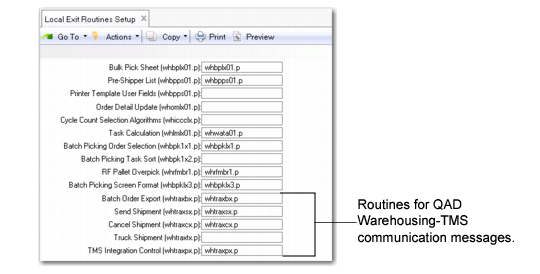
You must set routines in Local Exit Routines Setup (4.23.10) that support necessary communication between QAD Warehousing and the TMS. You can customize and rename the routines.
Local Exit Routine Setup (4.23.10)
Set routines for the following or use the system-supplied routine indicated within parenthesis:
Batch Order Export (whttraxbx.p)
Order Batch Export/Load Import (4.15.2.7) uses this routine to send and receive export messages with the TMS. Order Batch Export/Load Import lets you export the order batch selections created in Order Batch Selection (4.15.2.5). It uses this routine to create the batch shipment message, send the message to the TMS, receive a reply, and create loads.
Ship Shipment (whtraxsx.p)
RF Print Paperwork (3.8) uses this routine to send and process ship shipment messages with the TMS. QAD Warehousing sends the final contents of shippers, including containerization information, to the TMS. It then receives the shipping labels, freight charges, and tracking or PRO numbers that it stores in header records of the shipment.
Cancel Shipment (whtraxcx.p)
The RF Cancel Shipment (3.9) uses this routine to send a void shipment message to the TMS should you need to cancel a shipment. QAD Warehousing first validates that this shipment was sent to TMS using the ship shipment routine message and RF Print Paperwork functions. Once validated, it sends a message to the TMS to cancel the shipment and receives a cancellation reply.
Truck Shipment (whtraxtx.p)
The RF Ship Truck (3.5) uses this routine to process the EOD message. This message lets the system recalculate final freight charges and prorate truck level charges over individual shipments. Depending on the additional freight charges, the charges can be prorated over individual sales orders and loaded in its corresponding trailer charge when confirming orders.
For shipments belonging to a load, the system verifies that when users attempt to confirm a shipment, all other shipments for that same load are selected in the same transaction. If not selected, warnings or errors display, depending on Warehouse Transportation Control (4.15.2.24) settings. When communication problems occur, the system displays messages.