Freezing Inventory Balances
Use QAD EE Freeze Inventory Balance Freeze (3.16.4) to freeze inventory. You must freeze inventory prior to entering item counts. When you freeze inventory, the system records the current quantity on-hand balance at each site/location in a separate field in the location detail record.
Note: It is recommended that all outstanding inventory transactions be entered prior to freezing inventory balances. This includes transactions such as shipments, transfers, and receipts.
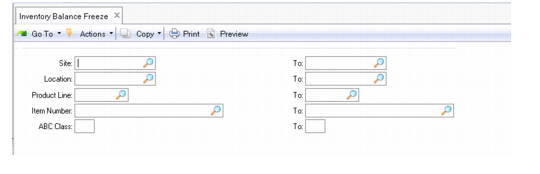
Inventory Balance Freeze (3.16.4)
Select inventory to be frozen using one or more of the following criteria:
• Site
• Location
• Product Line
• Item Number
• ABC Class
Specify a single selection (site 10000) or a range (site 10000 to 20000). To select all items, leave the range blank.
Even though inventory balances have been frozen, you can still enter transactions that affect on-hand inventory balances. Because of difficulties that can arise when the system reconciles counts after freezing inventory quantities, you should suspend inventory transactions, especially during audited or year-end inventories. This ensures accurate evaluation of inventory and simplifies the audit processing.