QAD 2017 Enterprise Edition
>
User Guides
>
Warehousing
>
Quality Inspection
>
Inspection Flows
Inspection Flows
This section examines the flow of inspected inventory throughout the warehouse.
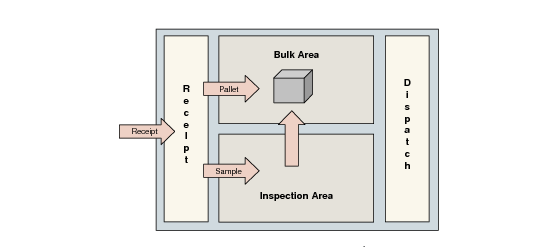
Example: You have a receipt area (docking area), an inspection area, and a main storage area (bulk area). Because the Quality Inspection module is based on internal routings, other areas and combinations can be defined, and so different movements are possible.
In
Inspection Flows, you receive a full pallet. The inspection algorithm identifies that an inspection is required and looks for an internal routing for the corresponding transaction type. The algorithm also calculates what quantity to control, and this sample quantity follows the quality inspection internal routing. The remaining items on the pallet continue the normal flow according to the receipt internal routing, and move to the Bulk Area.
Inspection Flows
After inspection has taken place, depending on the results (pass or fail) and depending on the destructive property of the test to perform on the item, the sample is sent back to inventory following another internal routing and using a put-away algorithm. If the algorithm is the merge with same reference algorithm, this means that the sample goes back on its original pallet. Of course, any other algorithm can be used for that movement.