QAD 2017 Enterprise Edition
>
User Guides
>
Warehousing
>
Quality Inspection
>
Quality Inspection Parameters
Quality Inspection Parameters
The inspection frequency, logical fields, and sample quantities are defined at different levels:
• Item Maintenance (4.4.7)
• Item-Site Maintenance (4.4.9)
• Item-Warehouse Maintenance (4.4.11)
• Supplier-Item Maintenance (4.4.13)
Item and item-site levels are not effective levels. They define the default values for the next levels. The two effective levels for Quality Inspection fields are the item-warehouse level and the supplier-item level.
The main level is the supplier-item level, which means that if a record exists for a given item and a given supplier, quality inspection fields are used from this level. In any other case, the item-warehouse values are used. Note that this level is a mandatory level. If item-warehouse level is not defined, no put-away or picking of the item in the corresponding warehouse is possible.
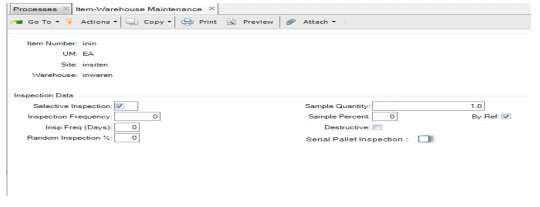
An example Item-Warehouse Maintenance screen is shown in
Item-Warehouse Maintenance (4.4.11), Inspection Data.
Item-Warehouse Maintenance (4.4.11), Inspection Data
Following is a definition of all the fields that must be reviewed prior to implementing the Quality Inspection module. These fields remain the same across all levels.
Selective Inspection
Indicate whether an inspection is to be performed.
Inspection Frequency
The value in this field determines the frequency at which inspections must take place (specific to algorithm 9) during receipt. For example, an inspection takes place every X receipts, X being the inspection frequency.
Note: The inspection frequency counts the number of receipts. If you receive three pallets during a purchase order receipt, the system considers that as three receipts. The inspection frequency field must take that into account.
Inspection Freq (Days)
This frequency is a number of days. It tells algorithms 1 and 2 that an inspection takes place if there was no inspection in the previous X days, X being the inspection frequency in days.
Random Inspection %
Specify a percentage of the quantity to be inspected using algorithm 10. In this case, inspection is based on a random % defined at the item/warehouse or item/supplier level. This percentage can be dynamically changed based on the results of the inspection.
Sample Quantity
Specify the quantity (in the item’s base UM) of the item to inspect. Depending on the internal routing definition, the sample goes to an inspection area.
Sample %
Specify a percentage of the quantity being received to be inspected. The system rounds the result if the percentage of the received quantity is not an integer.
Note: If 3 pallets are received at the same time and the inspection frequency is set that an inspection occurs at every receipt, each pallet is considered and not the entire receipt quantity as a whole.
Destructive
Indicate if the test applied to the sample is a destructive test.
Yes: The sample must be issued using an unplanned issue.
No: When the inspection does not fail, the system generates a new transaction based on a new internal routing to put the sample back in stock.
Serial Pallet Inspection
Specify whether a full pallet is inspected or individual serial items on the pallet are inspected.
Yes: The system inspects the full pallet and generates a transaction for pallet items. You must set Selective Inspection to Yes for pallet items for a full pallet inspection.
When one or more than one pallet is received at the same time, the system considers each pallet for inspection and not each serial item.
The system can generate transactions for pallet items, depending on how you set the Sample Quantity and Sample Percentage fields in Item-Site Maintenance and Multi-Level Item Maintenance,
No: Inspections must be carried out on individual serial items on the pallet rather than inspecting the full pallet. The system generates a transaction for each individual serial item on the pallet according to how you set the Sample Quantity and Sample Percentage fields.
When receiving different items on the pallets, this field has no impact on inspections.