Inspection Tag
Each sample is assigned a sample ID. That sample is linked to the original inventory. This means that if you make a receipt of 100 EA and the quality inspection algorithm sends 10 EA into the Inspection area, the sample is linked to the 90 EA in the Bulk area. The main reason is that it is possible to change the status of the received stock during the inspection and to release the status after inspection. This is only possible if you know what stock is related to the sample.
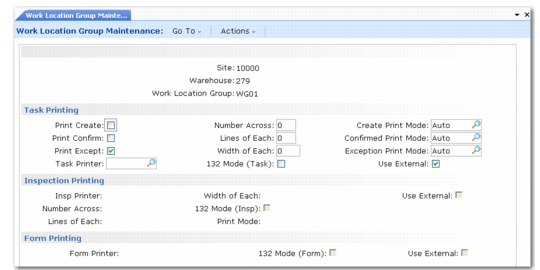
For each sample, the system prints an inspection tag. There is a special printer dedicated to the inspection tag printing, defined like any other printer at the work location group level, at the warehouse level, and at the Warehouse Control level. The effective level is the work location group level; other levels are used as default values.
Work Location Group Maintenance (4.3.9), Printing illustrates the frame in Work Location Group Maintenance (4.3.9) where all printers are defined.
Work Location Group Maintenance (4.3.9), Printing
The inspection tag contains the sample ID information, the item to inspect, and other useful information. Based on the inspection tag, people control the sample, enter the test results, and initiate the return movement from the inspection area, if the inspection did not fail and the test is not a destructive test.