QAD 2017 Enterprise Edition
>
User Guides
>
Warehousing
>
Messages and Alerts
>
Creating and Sending Messages
Creating and Sending Messages
Use Whse Message Maintenance (4.22.1) to create and send a message to RF users. The RF users are notified of the message on the RF device and once the message is read and acknowledged, the system marks the message as read. To read the message from within QAD Warehousing, use Whse Message Report (4.22.3).
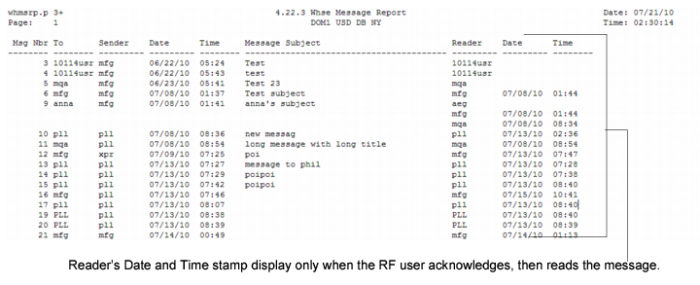
The system retains the messages for later review. Use Whse Message Browse to view messages by the number assigned to them by QAD Warehousing, along with the QAD ID of the sender and recipient, the date and time the message was sent, and the message subject. Additionally, the sender can check whether the message was read. Unread messages do not have the reader’s date and time stamp attached to them.
Whse Message Report (4.22.3), Sample Messages depicts messages that the system created and sent to the RF device as seen in Whse Message Report. In the list, the first three messages are unread because the reader’s date and time do not display. Message number 6 is read, as are Messages 10, 11, and so on. Message number 9 was sent to a group of users because there are three readers; however, reader
aeg did not read the message yet because the date and time for the reader do not display.
Use Whse Message Detail Inquiry (4.23.13) to view the actual content of messages sent to users on the RF device.
Whse Message Report (4.22.3), Sample Messages