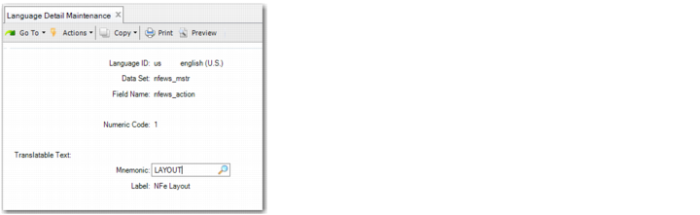
Numeric Code | Mnemonic | Label | Description |
1 | LAYOUT | NFe Layout | Electronic nota fiscal layout. |
2 | RECEIPT | Send NFe XML File | Send an electronic nota fiscal XML file to the SEFAZ Web service. |
3 | RETREC | Receive NFe Author | Receive authorization from the SEFAZ Web service to use an electronic nota fiscal. |
5 | USELESS | Unused NFe Number | Send a file with unused electronic nota fiscal numbers to the Web service. |
6 | STATUS | NFe Service Status | Verify the electronic nota fiscal service status. |
7 | INQUIR | NFe Inquiry | Check the service status. |
8 | CORLETT | Correction Letter | Send a correction letter to SEFAZ. |
15 | CANCEL | Cancel NFe | Request to cancel an electronic nota fiscal. |
20 | Authorization 3.1 | Receive authorization from the SEFAZ Web service to use an electronic nota fiscal v3.1 | |
22 | RECSVNA | Send NFe XML File - SVNA | Send an electronic nota fiscal XML file to the SEFAZ Web service in National Contingency Environment (SVNA) layout. |
23 | RETSVNA | Receive NFe Authorization - SVNA | Receive authorization from the SEFAZ Web service to use an electronic nota fiscal in SVNA layout. |
24 | CANSVNA | Cancel NFe - SNVA | Request to cancel an electronic nota fiscal in SVNA layout. |
25 | USESVNA | Useless number of NFe - SNVA | Send a file with unused electronic nota fiscal numbers to the Web service in SVNA layout. |
26 | STASVNA | Status - SNVA | Verify the electronic nota fiscal in SVNA format service status. |
27 | INQSVNA | Inquiry NFe - SNVA | Check the service status. |
28 | CORSVNA | Correction Letter - SNVA | Send a correction letter for a nota fiscal in SVNA format to SEFAZ. |
29 | AUTSVNA | Authorization - SNVA | Confirmation that the nota fiscal in SVNA layout has been authorized. |
31 | RECSVRS | Send NFe XML File - SVRS | Send an electronic nota fiscal XML file to the SEFAZ Web service in Rio Grande do Sul Contingency Environment (SVRS) layout. |
32 | RETSVRS | Receive NFe Authorization -SVRS | Receive authorization from the SEFAZ Web service to use an electronic nota fiscal in SVRS layout. |
33 | CANSVRS | Cancel NFe - SVRS | Request to cancel an electronic nota fiscal in SVRS layout. |
34 | USESVRS | Useless number of NFe - SVRS | Send a file with unused electronic nota fiscal numbers to the Web service in SVRS layout. |
35 | STASVRS | Status - SVRS | Verify the electronic nota fiscal in SVRS format service status. |
36 | INQSVRS | Inquiry NFe - SVRS | Check the service status. |
37 | CORSVRS | Correction Letter - SNRS | Send a correction letter for a nota fiscal in SVRS format to SEFAZ. |
38 | AUTSVRS | Authorization Sync - SNRS | Confirmation that the nota fiscal in SVRS layout has been authorized. |