Printing the DANFE
If you have selected to keep the electronic nota fiscal authorization and print processes separate from shipper confirm, you can use DANFE Print to print a DANFE for an authorized nota fiscal.
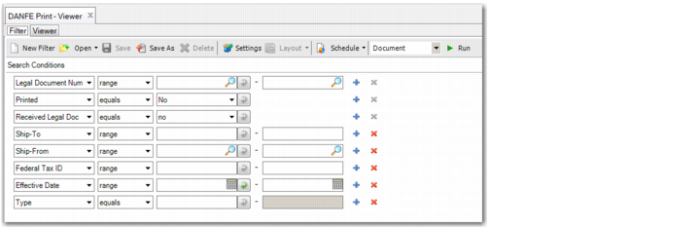
DANFE Print, Selection Criteria
Legal Document Number
Specify the legal document number or range of legal document numbers for which you want to print DANFEs.
Printed
Select Yes to print DANFEs that were printed previously.
Select No to print DANFEs that were not printed previously. This is the default.
Received Legal Document
Select Yes to print DANFEs for legal documents that your company has received.
Select No to print DANFEs for legal documents that your company has issued. This is the default.
Ship-To
Specify the ship-to code to print DANFEs for legal documents with this ship-to code.
Ship-From
Specify the ship-from code to print DANFEs for legal documents with this ship-from code.
Federal Tax ID
Specify the federal tax ID or range of federal tax IDs for which you want to print DANFEs.
Effective Date
Specify the effective date for which you want to print DANFEs.
Type
Specify the legal document type.
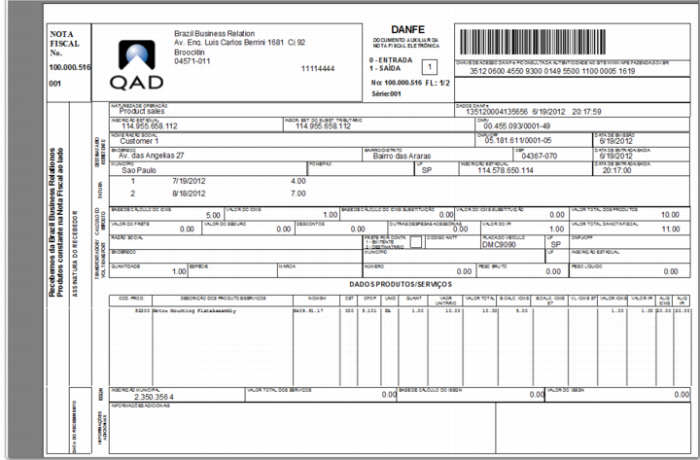
DANFE Report