QAD Internationalization Extensions, Brazil 4.0
>
User Guide
>
Electronic Notas Fiscais
>
Issuing Electronic Notas Fiscais
Issuing Electronic Notas Fiscais
When you have completed the setup, the system can generate electronic notas fiscais, request authorization from SEFAZ, and print the DANFE as part of the sales order shipment process.
When the option to create electronic notas fiscais is activated and the required setup is in place, the following functions that generate shippers also let you generate electronic notas fiscais:
• Picklist/Pre-Shipper - Automatic (7.9.1)
• Pre-Shipper/Shipper Workbench (7.9.2)
• Sales Order Shipper Maintenance (7.9.8)
• Issues - Unplanned (3.7)
• Item Transfer (3.4)
• Distribution Order Shipments (12.17.22)
• Sub Shipper Maintenance (18.22.5.5)
• Material Order Maintenance (10.7.1 and 11.11.1)
• Material Order Shipments (10.7.6 and 11.11.6)
• Call Activity Recording (11.1.1.13)
• RMA Maintenance (11.7.1.1)
• RMA Shipments (11.7.1.16)
• RTS Shipments (11.7.3.16)
• Work Order Component Issue (16.10)
• Repetitive Labor Transaction (18.14)
• Repetitive Picklist Transfer (18.22.3.6 and 18.3.6)
• Backflush Transaction (18.22.13)
• Receipt Backflush (16.12)
• Rework Transaction (18.22.17)
• Pending Invoice Maintenance (7.13.1)
• Sales Order Shipment (7.9.15)
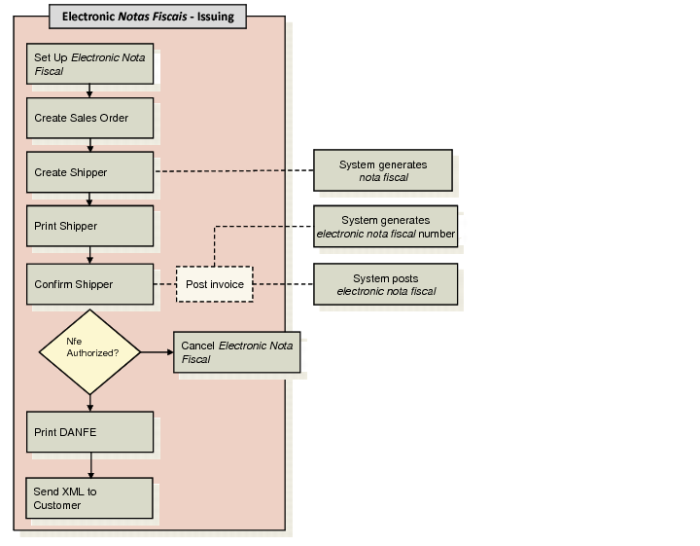
Electronic Notas Fiscais Issuing Flow
The flow for creating electronic notas fiscais is as follows:
2 Create a sales order. See User Guide: QAD Sales for more information on sales orders and shipping.
3 Create a shipment record or notice of receipt. You record specific electronic nota fiscal data in this step.
4 Print the shipper.
5 Confirm the shipper. You post the invoice and the system generates the XML file containing the nota fiscal data as part of this step. The XML file is signed using the certificate installed.
6 If you are using the automatic process, the system requests authorization from SEFAZ as part of the shipper confirm process.
If you are using the manual process, you must run Authorization Receipt separately to seek authorization from SEFAZ. See
Obtaining SEFAZ Authorization Manually.
The file undergoes a validation process in SEFAZ. The system downloads a new XML file containing the receipt received from SEFAZ and returns SEFAZ validation. If the electronic nota fiscal has been authorized, SEFAZ returns the authorization protocol. If the file is rejected, the system displays notification of this.
7 If the electronic nota fiscal is authorized, you can print the DANFE. If you are using the automatic process, the system prints the DANFE as part of the shipper confirm process after authorization is received from SEFAZ.
If you are using the manual process, you must run DANFE Print to print the DANFE. See
Printing the DANFE.