Using Contingencies
There may be circumstances under which you cannot transmit electronic nota fiscal XML files to SEFAZ as normal due to, for example, an interruption in the Web service. In these cases, you can use a contingency process to send the electronic nota fiscal files. For example, you can print the DANFE on a paper form and send it to SEFAZ in hard copy.
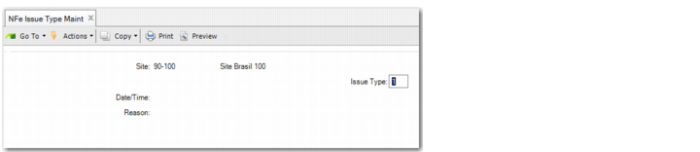
Use NFe Issue Type Maint to switch to a mode of contingency. When the technical problems are resolved, you must then immediately transmit the electronic nota fiscal XML file to SEFAZ.
If technical problems occur with the SEFAZ Web service, the authorities may also recommend that you redirect to another contingency site (Web service) and transmit the electronic nota fiscal file to this site.
There are four types of contingencies:
• 2: Contingency using a Security Form
This is the simplest contingency for use in situations when you cannot transmit the electronic nota fiscal files to SEFAZ as normal due to, for example, Internet connectivity issues. The FS contingency is the least dependent on available infrastructure, hardware, or software.
You then print the DANFE on a Security Form (Formulário de Segurança) and send it to SEFAZ in hard copy. The DANFE (Documento Auxiliar da Nota Fiscal Eletrônica) is a simplified graphical representation of the electronic nota fiscal.
• 5: FS-DA contingency
This contingency option is very similar to the Security Form, except that, in this case, you print on an Auxiliary Document Security Form (Formulário de Segurança para Impressão de Documento Auxiliar (FS-DA)) and send it to SEFAZ in hard copy.
• 6: SVNA contingency
The National Contingency Environment enables you to transmit to Virtual Contingency SEFAZ (SVC), or to print the DANFE on plain paper when there are technical problems. There is no need to transmit the electronic nota fiscal files when the technical problem is resolved. This type of contingency does not require the use of specific NFe serial codes.
• 7: SVRS contingency
The Rio Grande do Sul Contingency Environment works in the same way as the SVNA contingency, but applies to the state of Rio Grande do Sul.
Important: As soon as the technical problems are resolved, reset the value in the Issue Type field of NFe Issue Type Maint to 1 and send the electronic
nota fiscal files using Receipt Authorization. See
Obtaining SEFAZ Authorization Manually.
NFe Issue Type Maint
Site
Specify the site that is sending the electronic nota fiscal.
Issue Type
Specify a value that indicates the issue type.
1: Indicates normal functioning where you send the electronic nota fiscal files to the SEFAZ Web service.
2: Contingency using a Security Form.
5: FS-DA contingency.
6: SVNA contingency.
7: SVRS contingency.
Date/Time
Specify the date/time for the contingency solution.
You must specify a date and time if the issue type is 2, 5, 6 or 7.
Reason
Specify the reason for the contingency solution. You must specify a reason if the issue type is 2, 5, 6 or 7.