Fiscal Data
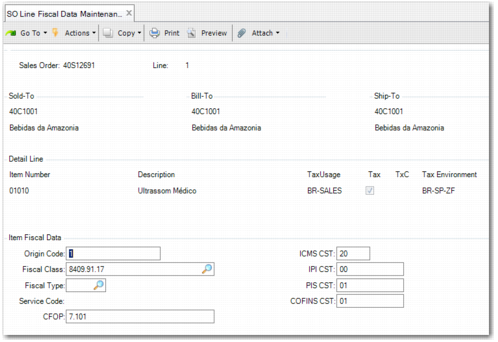
This chapter describes the function of the program SO Line Fiscal Data Maintenance (7.1.9).
Supplying Fiscal DataDescribes how to edit the fiscal data that was created as part of a sales order.
Supplying Fiscal Data
At times, the user creating a sales order may not know the required fiscal data. However, the fiscal data entered in the sales order is used by default when you create a shipper. In turn, this data then used in the legal document.
Therefore, there is a separate program to enable you to enter updated fiscal data for an existing sales order or sales order line before you create the shipper. SO Line Fiscal Data Maintenance (7.1.9) enables you to edit fiscal data for a sales order or sales order line.
Enter the sales order number and the line number and, when you click Next, the Item Fiscal Data fields are displayed. You can change any of the fiscal data field values on this screen. These values are then used when you create the shipper.
SO Line Fiscal Data Maintenance
When you create the shipper and you reach the Complementary Data Frame, the Legal Doc Detail Maint field is not selected by default, meaning that fiscal data is not subsequently displayed. It is therefore assumed that the correct fiscal data has been supplied in Sales Order Maintenance or SO Line Fiscal Data Maintenance. However, you can select this field when you want to verify or change the fiscal data. The fiscal data in the shipper is used in the legal document.
Note: If the shipper is created from non-sales or DRP, the Legal Doc Detail Maint field is selected by default.