Field | Description |
1. Header | |
Version | Identifies the file version used. |
Company ID | Contains the registration number of the company. |
Tax Registration Number | Contains the fiscal registration number of the company. |
Tax Accounting Basis | Indicates the tax accounting basis. The options are Invoice Accounting, Cash Accounting, Delivery, or Other. |
Company Address | |
Building Number | The building number. |
Street Name | The street name. |
Address Detail | The address lines. |
City | The city or town. |
Postal Code | The postal code. |
Region | The Brazilian region. |
Country | The country name. |
Relationship Code | The relationship code for the business relation. |
Tax Entity | The company, division, or branch reference. |
Fiscal Year | The company’s financial year. |
Start Date | The first day of the company’s financial year. |
End Date | The last day of the company’s financial year. |
Currency Code | The three-character ISO currency code for the local currency in which accounts are audited. |
Date Created | The date on which the file was created. |
Product ID | The ID of the software that generated the file. |
Product Version | The version of the software that generated the file. |
Taxonomy | The XBRL taxonomy referred to in the lead code. |
Header Comment | Comments added to the header file. |
2. Master Files | |
2.1 General Ledger | |
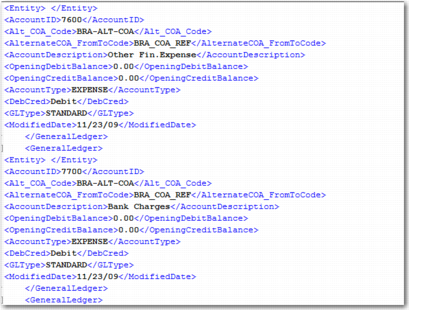
Entity | The entity code. |
Account ID | The GL code for the GL individual account. |
Alternate COA Code | The alternate COA code specified in the selection criteria. |
COA Cross Reference Code | The COA cross reference code specified in the selection criteria. |
Account Description | The name of the individual account. |
Opening Debit Balance | The opening debit balance of the account. |
Opening Credit Balance | The opening credit balance of the account. |
Account Type | The category of account: Asset, Liability, Sales, or Expense. |
Deb/Credit Account | Indicates if the account is a debit or a credit account. |
GL Type | Indicates the account type: Standard, Tax, or Bank. |
Modified Date | Indicates the modified date. Only accounts that have changed since the modified date are included. |
2.2 Alternate COA | |
2.2.1 Header Information | |
Alternate COA Code | The code that identifies the alternate COA structure. |
Alternate COA Description | A description of the alternate COA structure. |
2.2.2 Line Information | |
Alternate COA Detail Code | The alternate COA code for the line. |
Alternate COA Detail Description | A description of the alternate COA code for the line. |
Alternate COA Detail Column Name | The column label for child (non-first level) accounts. |
Alternate COA Detail Level | A numeric identifier that indicates the level of the account in relation to the alternate COA structure. |
Alternate COA Detail Sum | Indicates whether a node is at the lowest level in the tree. |
Parent Alternate COA Detail Code | The alternate COA code that is the parent of a child row. |
2.3 Alternate COA—From-To | |
2.3.1 Header Information | |
COA Cross Reference Code | The COA cross-reference that links the alternate COA to the corresponding operational GL accounts. |
2.3.2 Line Information | |
GL Account From | The first GL account in the alternate COA cross-reference mapping. |
Sub-Account From | The first sub-account in the alternate COA cross-reference mapping. |
Cost Center From | The first cost center in the alternate COA cross-reference mapping. |
Project From | The first project in the alternate COA cross-reference mapping. |
Target Alternate COA | The target alternate COA to which the operational COA elements are mapped. |