DDA Import File
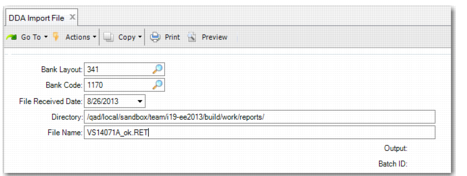
DDA Import File (28.1.1.14.1) enables you to import a file provided by the bank that contains a list of Boleto Bancario with a particular Federal Tax ID.
DDA Import File
Bank Layout
Select the bank layout for this file.
Note: For the generalized codes field i19_br_bank_layout, only Bank Itau is currently supported.
Bank Code
Select the bank code of the bank account that you received the file from.
File Received Date
Enter the date that the file was received from the bank.
Directory
Enter the directory where the file is stored.
File Name
Enter the file name.
To upload the file, click Next. If the file was already executed and you attempt to do it again, a message is displayed, asking whether you want to continue.
When the file is uploaded, the following Boleto Bancario information is created in the system:
• Federal Tax ID/Supplier Code
• Due Date
• Amount
• LD Number
For matching to take place, the following conditions must be satisfied:
• The Payment Reference field in the supplier invoice record must be blank.
• The supplier invoice balance amount must equal the Boleto Bancario amount or be within the specified tolerance.
• The supplier invoice reference must match the Boleto Bancario LD number.
• The due dates must match or be within the specified tolerance.
• The federal tax IDs or supplier codes match.
• The supplier invoice must be open.
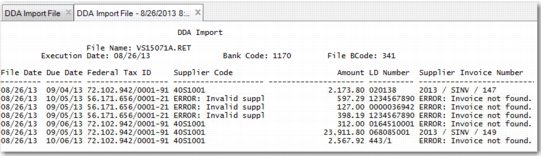
The results of the upload are displayed in a report, as shown in
DDA Import File Report.
DDA Import File Report
This report contains important details on the matching that took place on upload. The Supplier Invoice Number column displays details of the supplier invoice matched to the Boleto Bancario. The LD Number column displays the Legal Document number and the Amount column displays the matched amount. The Federal Tax ID column displays the matched federal tax ID File. If no supplier is found with the federal tax ID, a message is displayed.
When a record is matched to an invoice, the Payment Reference field in the Supplier Invoice program is updated with the Boleto Bancario number. If a record is already matched to a supplier invoice, a message is displayed. You can then review the supplier invoice manually and determine whether the record is correct.