QAD Internationalization Extensions, Brazil 4.0
>
User Guide
>
Import and Export Data
>
Updating Export and Import Data
Updating Export and Import Data
Updating Exportation Data on Invoices
In Brazil, a company has a contract with a bank to handle export invoices according to exportation processes. An exportation invoice number is needed to select invoices for payment. Therefore, this number must appear in customer invoices so you can select them for payment.
Update Exportation Data on Invoice (7.10.7.9) enables you to select legal documents from the exportation flow and update the related customer invoices with the exportation declaration number from outbound shipments. When you perform the update, the Description field in the customer invoice is updated with the exportation invoice number.
You can also use this program to check whether declaration information has been correctly set and to find invoices for legal documents.
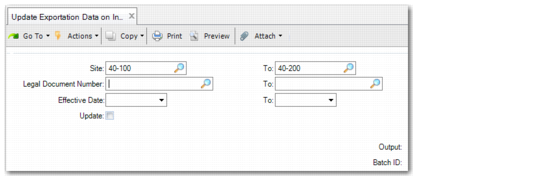
Update Exportation Data On Invoice Criteria
Site
Enter a ship-from site or ship-from site range. If you only want to search for legal documents issued from a particular site, you must enter that site in both fields.
Legal Document Number
Enter a legal document number or range. If you want to search for a particular legal document, you must enter the number in both fields.
Effective Date
Enter a date range to be covered by the update and report.
Update
When you select this field, the customer invoice description field will be updated. A log is stored to check if legal document information has already been exported to the customer invoice.
Output
Choose an output format.
Batch ID
If you are using batches, you can select a Batch ID.
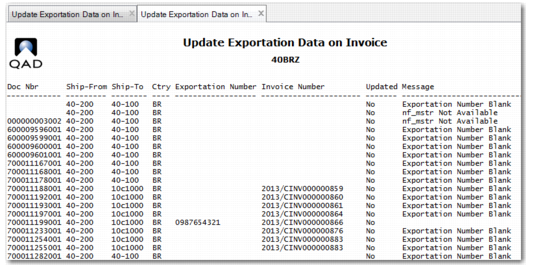
Update Exportation Data on Invoice produces a report, which is displayed in
Update Exportation Data On Invoice Report.
Update Exportation Data On Invoice Report
After the field is populated in the respective invoices, use Open Item Adjustment Create (25.13.5) to select and group invoices by invoice description. The payment can then be processed for the grouped invoice.