QAD Internationalization Extensions, Brazil 4.0
>
User Guide
>
Custom Legal Documents
>
Issuing Custom Legal Documents
Issuing Custom Legal Documents
In most situations, two legal documents are issued simultaneously, one for sales and one for remit. However, for a complex scenario where several companies are involved in the supply chain, you may need to issue more than two legal documents at the same time.
Note: This functionality is available from QAD 2013 Enterprise Edition.
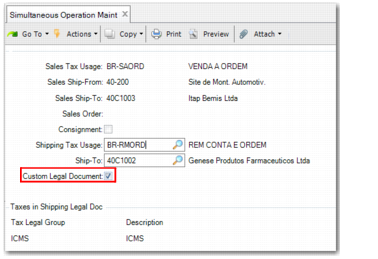
To specify that a particular combination of ship-from and ship-to is to trigger the creation of a custom legal document, select the Custom Legal Document field in Simultaneous Operation Maint (7.10.13), as displayed in
Simultaneous Operation Maint, Custom Legal Document Field.
Simultaneous Operation Maint, Custom Legal Document Field
A custom program is delivered with the package to serve as a sample for customization. Set up the system to use this program in the Cust Program menus (36.4.28). The related entry and execution programs are gpldsoct.p and soldsoctbr.p. When you create a custom shipper using this program, a message displays the shipper ID.
The custom shipper is similar to the one created in Non-inventory Shipper Maintenance (3.15.3) and is linked to the sales shipper. When the custom shipper is created, the custom program also generates a legal document. A message is also displayed at the bottom of the screen, showing the shipper ID.
In Pre-shipper/shipper Confirm (7.9.5), the non-sales non-inventory shipper can be confirmed to account for the taxes in the created legal document. An inventory transaction ISS-MEMO is created.
When there are multiple legal documents in a shipper, the legal documents must also reference each other so you can facilitate and reconcile the related material process. Tax departments also need this reference to reconcile legal document amounts and tax amounts. Therefore, the NFe XML file from the each legal document references the legal document number from the other legal document. This information is also printed in the DANFE.
Use Pre-shipper/Shipper Unconfirm (7.9.21) to unconfirm the created non-sales non-inventory shipper. When you unconfirm the shipper, transactions for the custom legal document are reverted and the custom shipper is reopened.