QAD Internationalization Extensions, Brazil 4.0
>
User Guide
>
Brazilian Reports
>
GL Transaction by Account – LD Report
GL Transaction by Account – LD Report
Business Requirement
In Brazil, companies who want to submit a Razão report to the fiscal authorities must be able to generate a report with GL transactions by account. The Razão report is optional in Brazil.
QAD Solution
QAD has developed the GL Transaction by Account – LD report to meet Razão reporting guidelines.
Running the Report
Use GL Transaction by Account – LD (25.15.7.14) to run the report.
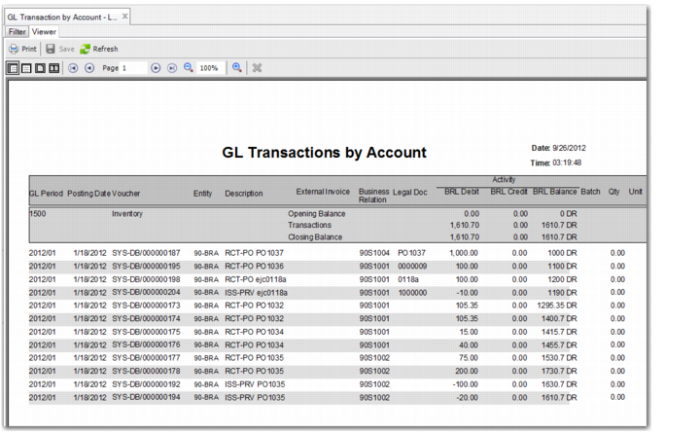
The report shows the account, sub-account, and cost centers descriptions, balances, and debit and credit activity. All posted GL transactions for a selected period or date range are printed. The report can include GL accounts with or without movement and can include GL accounts with or without zero balances.
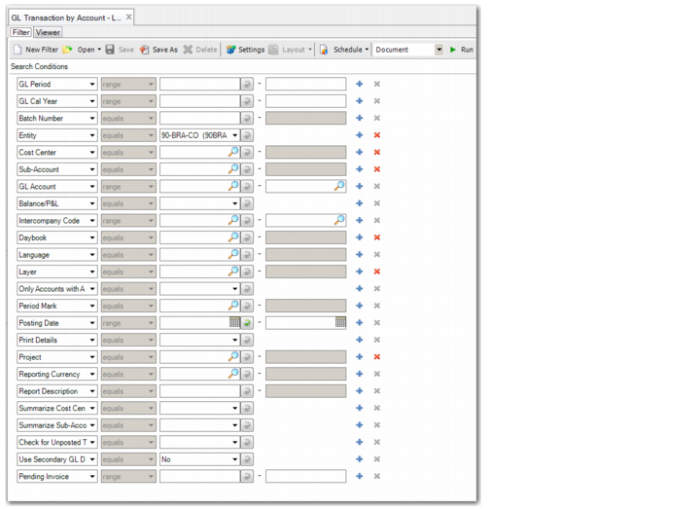
GL Transaction by Account – LD Report, Selection Criteria
The GL Period, GL Cal Year, Posting Date, Entity, Daybook, Reporting Currency, Pending Invoice, Layer, Language, and Check for Unposted Transactions selection criteria are also included in the GL Transaction Report – LD, and are described beginning on
here.
Batch Number
Enter a batch number to only include transactions in the report with this batch number.
The batch number is a randomly generated number that is assigned to each record processed in a single event. If a group of transactions are posted together, they will all have the same batch number.
Sub-Account
Specify the sub-account for which to run the report.
Cost Center
Specify the cost center for which to run the report.
GL Account
Specify the GL account for which to run the report.
Balance/P&L
Select Balance Sheet to only include balance sheet accounts in the report
Select P&L Account to only include Profit and Loss accounts in the report.
Intercompany
Specify the intercompany code or range of codes to print details on accounts with those codes.
Only Accounts with Activity
Select Yes if you only want to include details on accounts for which there was activity during the period indicated for the report.
Select No to include details on all accounts that meet the search criteria, regardless of activity.
Period Mark
Specify a period mark to include matching transaction details.
Period marks identify the period during which a transaction was posted and also describe the status of the period in GL reporting. Period marks are system-defined.
Print Details
Select Yes to print account descriptions in addition to account codes.
Select No to print account codes only.
Project
Specify the project for which to run the report.
Report Description
Enter text to display in the header of the report, if required.
Summarize Cost Center Project
If you select Yes, subtotals at the cost center or project level are not displayed.
If you select No, subtotals at the cost center or project level are displayed.
Summarize Sub-Account
If you select Yes, the subtotals at sub-account level are not displayed.
If you select No, the subtotals at sub-account level are displayed.
Use Secondary GL Description
Select Yes to print the secondary GL description on the report, where applicable. You can record a secondary GL description in Journal Entry Create.
Select No if you do not want to print secondary GL descriptions on the report.
GL Transactions By Account – LD