GDPdU
Business Requirement
In Germany and other European Union countries, companies must allow tax auditors to verify data in their accounting systems. One method companies use to provide access to auditors involves the use of electronic audit files. These electronic files must contain the relevant tax audit data.
For Germany, the governing regulation is called GDPdU, and the data must be in a format that can be imported into IDEA, which is the auditing software used by the majority of German tax auditors.
QAD Solution
QAD has developed the audit interface to meet German GDPdU requirements. The extract generates a text file and, optionally, an XML file that contains information regarding the audit text file layout.
The extract does not include year-end closing transactions.
Prerequisites
Setting Up GDPdU Generalized Codes
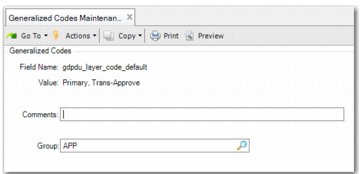
Use the gdpdu_layer_code_default field in Generalized Codes Maintenance (36.2.13) to define a default list of accounting layers from which the system extracts transactions for the GDPdU.
Generalized Codes Maintenance, Default GDPdU Layers
Field Name
Enter gdpdu_layer_code_default.
Value
Specify one or more layer codes that you want to set as default. The layers you specify will be the default values for the Layer Code field in the GDPdU extract.
Report Access
Access Germany GDPDU (36.5.8.12.2).
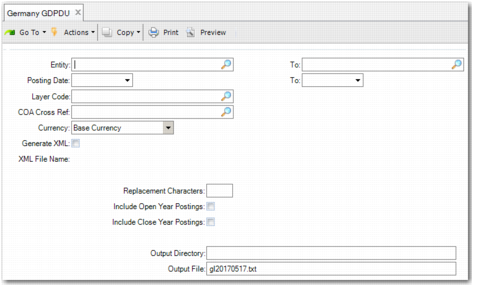
Germany GDPDU (36.5.8.12.2), Selection Screen
The extract includes the following selection criteria:
Entity
Specify the range of entities for which to run the extract.
Posting Date
Specify the date range for which to extract transactions.
Layer Code
Specify the accounting layers from which to extract transactions. The system only extracts transactions posted to the accounting layers you specify. Set the default value for this field using the gdpdu_layer_code_default field in Generalized Codes Maintenance. See
Setting Up GDPdU Generalized Codes.
If you leave the field blank, the system extracts data from all accounting layers.
COA Cross Ref
Specify the COA cross-reference that indicates the chart of account to use for the extract.
Currency
Choose either Base Currency or Statutory Currency.
Generate XML
Select this field to generate an XML output file in addition to the text audit file. See
XML File.
XML File Name
If you select the Generate XML field, the system automatically assigns the XML file name based on the text file name specified in the Output File field. This field is read only.
Replacement Characters
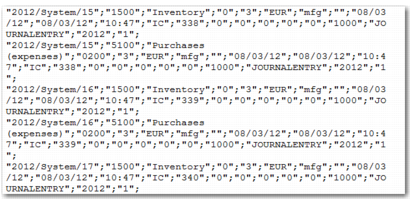
In the text audit file that the extract produces, the " character starts and ends each field, as in
Example Excerpt from a Text Audit File.
By default, when the text within one of the fields in the text audit file contains the " character, this character is removed to ensure that the content is processed correctly.
You can use this field in the selection criteria to specify two characters with which to replace the " character; for example, you can specify two ' characters as the replacement characters for ".
Include Open Year Postings
If you want to include open year postings in the report, then select this field.
Include Close Year Postings
If you want to include closed year postings in the report, then select this field.
Output Directory
Specify the directory to which the text and XML files must be generated.
Output File
Specify the file name for the text audit file. This field is mandatory.
If the output file you specify already exists, the system prompts you to indicate whether or not you want to overwrite the existing file of the same name. If you select No, you must specify a different output file name.
If you select the Generate XML option and update the file name for the text output file, the XML file name is updated accordingly.
Text Audit File
Example Excerpt from a Text Audit File
The audit text file includes the following details:
• Journal entry reference
• Account
• Account description
• Cost center
• Transaction amount
• Transaction currency
• User
• Journal entry description
• Posting date
• Creation date
• Time (for work order and inventory control transactions)
• Transaction type
• Transaction original document
• Tax environment
• Tax usage
• Tax code
• Tax base amount
• Tax amount
• Entity
• Daybook type
• Year
• Exchange rate
XML File
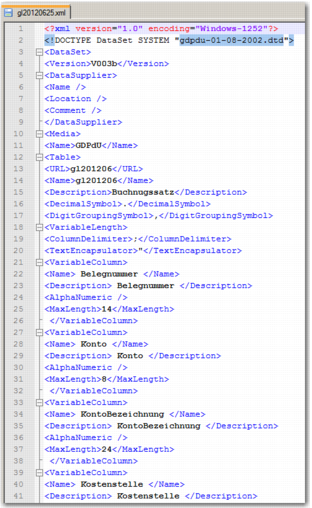
The optional XML output file contains information on the layout of the text file such as the fields, field types, and field lengths.
Example Excerpt from an XML Output File