eBilanz
Business Requirement
In Germany, companies must send their Balance Sheet reports to the tax authorities annually in eXtensible Business Reporting Language (XBRL) format. The XBRL taxonomy is defined by the German tax authorities.
This requirement applies to all German companies and became mandatory from the fiscal year 2012. The information in the eBilanz report is the account balance and activity amounts for a given accounting year.
QAD Solution
QAD’s solution is composed of two parts:
• Data extraction.
QAD has developed an eBilanz extraction utility that generates a CSV file that contains all account balance and activity information.
• Conversion of the extracted file to XBRL format and the declaration to the government.
For the second step in the process, QAD partners with AvenDATA GmbH (Berlin, Germany). The extracted data is imported to AvenDATA’s eBilanz-Kit, which then generates the XBRL file and transmits it to the German tax authorities.
Customers must enter into a separate license and support agreement with AvenDATA.
The following section describes part one of QAD’s eBilanz solution. For information on how to perform part two of the eBilanz solution, refer to AvenDATA for assistance and documentation.
Prerequisites
Setting Up eBilanz Generalized Codes
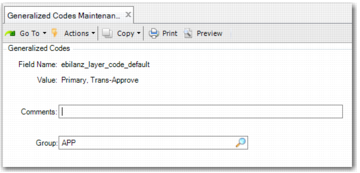
Use the ebilanz_layer_code_default field in Generalized Codes Maintenance to define a default list of accounting layers from which the system extracts transactions for eBilanz.
Generalized Codes Maintenance, Default eBilanz Layers
Field Name
Enter ebilanz_layer_code_default.
Value
Specify one or more layers codes that you want to set as default. The layers you specify will be the default values for the Layer Code field in the eBilanz extract.
Report Access
Access Germany Ebilanz (36.5.8.12.1).
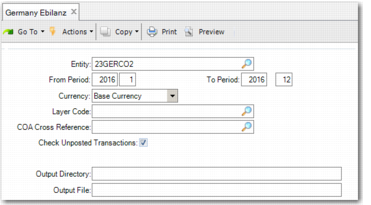
Germany Ebilanz (36.5.8.12.1), Selection Criteria
The report includes the following selection criteria:
Entity
Specify the entity for which to run the extract.
From Period, To Period
Specify the range of GL periods for which you want to run the extract.
Currency
Specify the currency in which the data must be extracted. The options are:
• Base currency
• Statutory currency
The extracted information must be in Euros.
Layer Code
Specify the accounting layers from which to extract transactions. The system only extracts transactions posted to the accounting layers you specify. Set the default value for this field using the ebilanz_layer_code_default field in Generalized Codes Maintenance. See
Setting Up eBilanz Generalized Codes.
If you leave the field blank, the system extracts data from all accounting layers.
COA Cross Reference
Specify the COA cross-reference that indicates the chart of account to use for the extract.
Check Unposted Transactions
Select this field if you want the report to check for unposted operational transactions. If you select this field and unposted operational transactions exist, the report will not run.
Clear the field if you do not want to check for unposted operational transactions.
Output Directory
Specify the directory to which the file must be generated.
Output File
Specify the file name for the report. This field is mandatory. The report generates a CSV file and a PRN file.
If the output file you specify already exists, the system prompts you to indicate whether or not you want to overwrite the existing file of the same name. If you select No, you must specify a different output file name.
Output Files
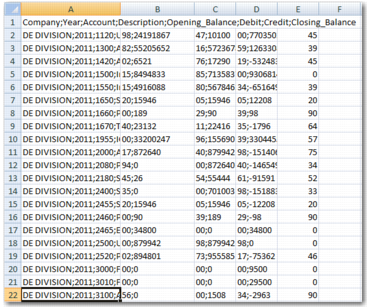
The CSV file generated by QAD EE can be read by the AvenDATA eBilanz-Kit for further processing
eBilanz Report, CSV File
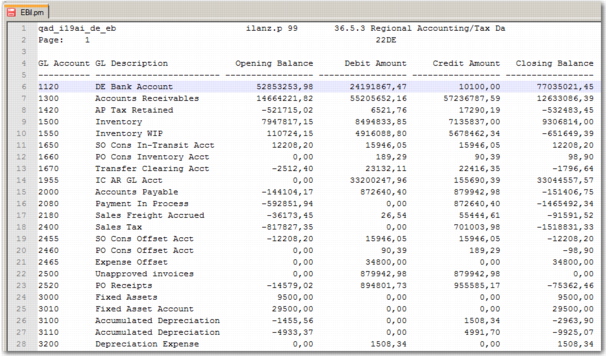
The eBilanz PRN file presents the report results in a more readable format.
eBilanz Report, PRN File