Removing Old Menus
From version 1.4 of this extension onwards, a number of programs are available from new menu numbers:
• Spain Model 340
• Spain Model 349
If you are installing this version of the Spain Internationalization Extension as a replacement for version 1.3.1 or earlier, you must run a utility to remove the old menus for these reports and then manually delete the related files that are saved on disk.
1 Open Progress Editor (36.25.80).
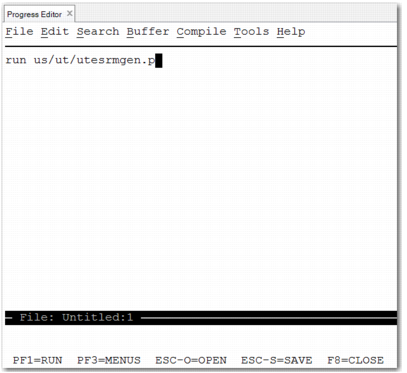
2 Enter run us/ut/utesrmgen.p and press F1.
Progress Editor (36.25.80)
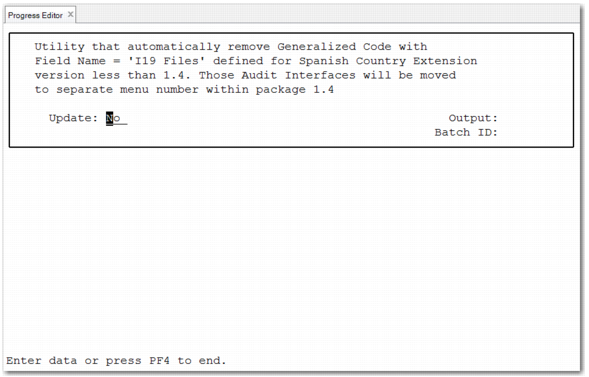
Running the Utility without Updating Generalized Codes
3 If you run the utility with the Update field set to No, a report shows the content to be removed, but no content is deleted.
4 To delete the data, run the utility again with the Update field set to Yes.
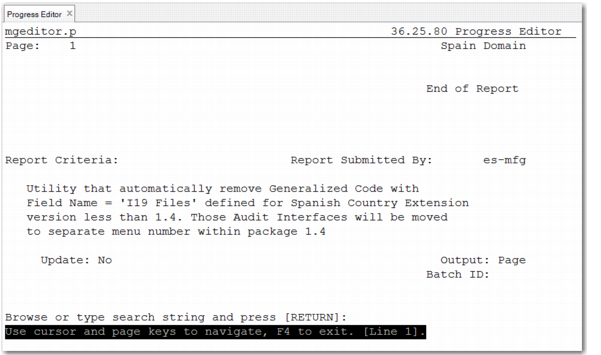
5 To confirm that the data is removed, run the utility for a third time, with the Update field set to No. The resulting report shows that there is no content for removal.
Empty List of Generalized Codes for Removal
6 After you have run the utility and removed the old menus from your installation, you must remove the related files that are saved on disk:
a Navigate to the us/qa folder.
b Manually delete the files:
• qad_i19ai_es_model340.p
• qad_i19ai_es_model349.p
• qad_i19ai_es_model340.r
• qad_i19ai_es_model349.r