Updating the SII Invoice Status of Existing Invoices
A utility was created to update the SII invoice status for all existing invoices. If an invoice has an associated qad_wkfl record, its SII invoice status is taken from qad_wkfl.qad_key3. If an invoice has no associated record (meaning the Spain SII Declaration was never run for it), the SII invoice status remains empty and is displayed as Not Sent in Spain SII Invoice browses.
1 Open Progress Editor (36.25.80).
2 Enter run us/ut/utessiis.p and press F1.
Progress Editor (36.25.80)
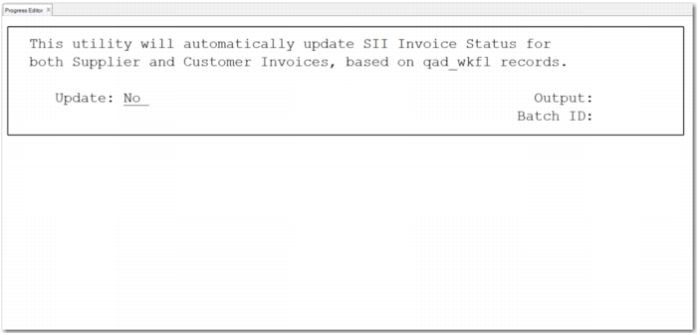
The utility starts, as shown in
Running the Utility.
Running the Utility
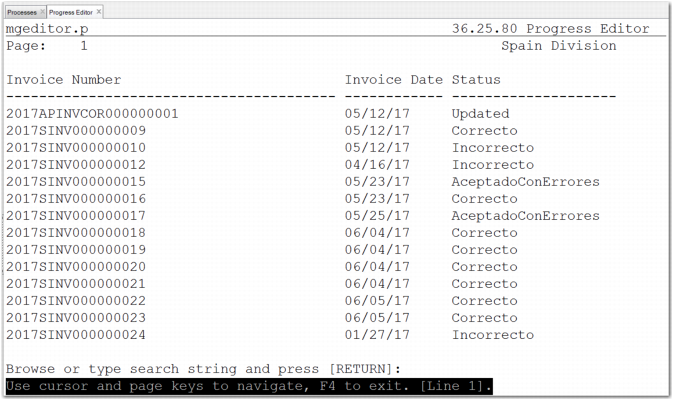
3 To update the SII Invoice Status field for both supplier and customer invoices, run the utility with the Update field set to Yes. A report shows the invoice status of each updated invoice.
If Spain SII Declaration (36.5.8.10.1) has not been run for an invoice, the SII Invoice Status remains empty and is displayed as Not Sent in Spain SII Supplier Invoice Browse (36.5.8.10.14) or Spain SII Customer Invoice Browse (36.5.8.10.15).
Note: You can only run this utility once; if you try to run it again the system displays an error message.
List of Invoices Updated by the Utility