Model 340 Statement
Business Requirement
Spanish legal requirements include the Model 340 statement, a monthly or quarterly VAT statement that lists all the transactions invoiced during the period selected. It must include all invoices issued and all invoices received.
Two different formats for Model 340 should be provided:
• State format
• Regional format
Model 340 must be declared using the Web site of the government tax authority, and electronic media format is required to upload the records.
QAD Solution
QAD has developed the Model 340 Statement report to meet Spanish requirements.
Prerequisites
• Business relation records must include telephone numbers for the delivered Model 340 Statement to provide a default for when the report is run. Contact person names are optional in setup records, although they are required on the report output.
• System and GTM setup must be complete.
• AR and AP invoice transactions must exist.
Generalized Codes Setup
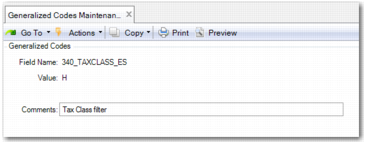
Although it is not a prerequisite, you can set up the generalized codes in
List of Generalized Codes for the Model 340 Statement before you run the Model 340 Statement report.
Generalized Codes Maintenance for the Model 340 Statement
List of Generalized Codes for the Model 340 Statement
Field Name | Values | Comments | Description |
340_TAXTYPE_ES | ES-VAT ES-ECP ES-ECS ES-ICP | Tax Type Filter | Comma-separated list of default values for the Tax Type report filter. |
340_TAXCLASS_ES | H M EXE | Tax Class Filter | Comma-separated list of default values for the Tax Class report filter. |
340_TAXUSAGE_ES | S Fa | Tax Usage Filter | Comma-separated list of default values for the Tax Usage report filter. |
340_REALESTATE_TAXUSAGE | | | Tax usage for real estate operations. |
340_GOVERNMENTALGRANT_TAXUSAGE | | | Tax usage for government grants. |
340_INSURANCE_TAXUSAGE | | | Tax usage for insurance operations. |
340_TRAVELLING_TAXUSAGE | | | Tax usage for traveling operations. |
340_AGRICULTURAL_TAXUSAGE | | | Tax usage for agricultural operations. |
340_3RDPARTIES_TAXUSAGE | | | Tax usage for third party operations. |
340_ISP_TAXUSAGE | | | Tax usage for ISP management. This value appears as a default value in the Tax Usage report filter. |
340_OUT_DIR_ES | | | Default value for the output directory where the Model 340 Statement is saved. |
Report Access
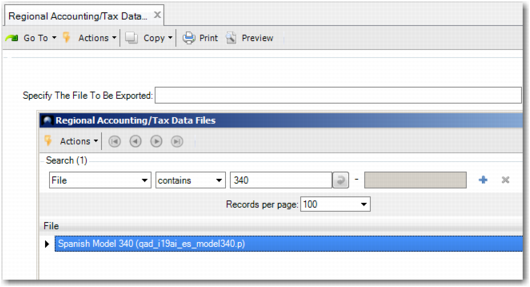
Launch Regional Accounting/Tax Data Export (36.5.3). Then select Spanish Model 340 from the look-up browse and click Next.
Regional Accounting/Tax Data Export
Report Format
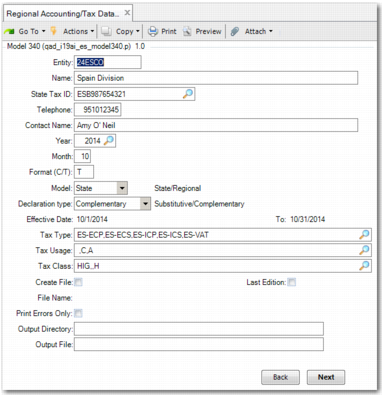
Model 340 Statement Report, Selection Screen
The Model 340 Statement report includes the following selection criteria:
Entity
Displays the entity code. This field is mandatory.
Name
Displays the name of the entity. This field is mandatory.
State Tax ID
The tax ID of the entity, where applicable. This field is mandatory.
Telephone, Contact Name
Government regulations require a contact telephone number and name as part of the delivered statement. These fields are mandatory.
The default is from the primary business relation record for the entity.
Note: These are not required fields in Business Relation Create. However, you must populate these fields before you can generate a statement.
Year, Month
The system uses this information to select records and to determine the file name. These fields are mandatory.
Format (C/T)
The format of the report.
• C: The report is in human-readable format for delivery by e-mail, on a CD, or other similar method.
• T: The report is in structured ASCII file format that meets specifications required for it be loaded into a government system. This is the default value.
Model
The intended audience.
• State: Report meets requirements of the central Spanish government. This is the default value.
• Regional: Report is intended as a regional or local declaration.
Declaration Type
The type of declaration.
• Complementary: Use this report type to create a report for data that has never been reported on for the period. For example, in the first monthly declaration, all invoices are reported on. In the second monthly declaration, only additional invoices are reported on.
• Substitutive: Use this report type to correct an existing declaration for the same period.
Effective Date
The system populates these fields based on the values of Year and Month.
Tax Type, Tax Usage, Tax Class
Optionally, enter comma-separated lists of codes for selecting invoices to be included in the declaration report. To set default values for these fields, use the generalized codes in
List of Generalized Codes for the Model 340 Statement.
Create File
Specify whether you want to create a file for delivery to the government. When you select this field, the system generates a file to be delivered to the government based on the setting of File Format. The report is also output to the directory shown in Output Directory, with the title specified in Output File. This content is in human-readable format. The file identified in File Name is formatted to be loaded electronically into the government’s system.
If you do not select the Create File field, the system does not create the file for government delivery. Instead, it writes the report to the Output File. You can review the output for error messages.
Last Edition
Select this when you want to generate the ID declaration number. If this field is not selected, the model is created as a draft, and the ID declaration number does not change.
File Name
When Create File is Yes, the system displays a file name based on the government-specified naming convention. This file has a .dat file extension. The file name is determined by the value of Model:
• State: 340.MMYY
• Regional: 340Foral.MMYY
The MMYY value is derived from the Year and Month fields.
Print Errors Only
Select this option to limit the Output File to error messages. Otherwise, the file includes the complete content of the statement, as well as error messages.
Output Directory
Specify the directory in which you want to save the files that are generated when the Model 340 Statement is run. You can set up a default directory using the 340_OUT_DIR_ES generalized code.
Output File
Enter the name of the file that the system creates for review and validation. This file has a .prn extension.
Model 340 Statement, .prn Output File
Model 340 Statement, .dat Output File