QAD QXtend Excelerator Overview
This section provides an overview of QAD QXtend Excelerator.
IntroductionOutlines the processes of Excelerator and discusses the Excelerator menu
Data Integration Process MapIllustrates the workflow used in the data integration process
Introduction
QAD QXtend Excelerator is an optional data integration tool within the QAD QXtend interoperability framework that provides additional data visibility and manageability to the data integration process between QAD products.
Excelerator helps you perform the following data integration tasks more easily and efficiently:
• Perform initial data load to implement QAD Enterprise Applications.
• Perform data migration to upgrade QAD Enterprise Applications.
• Transfer and convert business transaction data from one QAD application to another.
Excelerator is used with QXtend Inbound and Outbound, which must be properly implemented before you can use this tool.
Seamlessly integrated with Microsoft Excel 2007, 2010, and 2013 as a document-level customization, Excelerator provides the following functions all in a familiar and intuitive user interface:
• Designing the worksheet template
• Populating the worksheet with data
• Viewing and modifying data in the worksheet
• Synchronizing data with the target QAD application
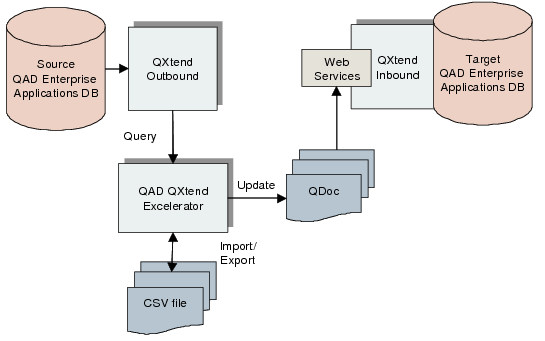
You first create an Excelerator data integration worksheet template by downloading and importing a QDoc (QXtend API schema) from a QXtend Inbound instance. You can further configure the worksheet to hide tables and columns to simplify data entry.
To prepare data to load into the target QAD application, you can import data into the worksheet from three data sources: manual data entry, CSV files, and the Query Service in QXtend Outbound.
You then update data from the Excelerator worksheet to the target QAD application through QXtend Inbound. You select a QXtend instance and receiver to receive the data and can specify whether to use SSL to call the QXtend Web service. The system performs authentication when processing records using the QXtend Web service, and you can stop and restart the load process. If errors occur during the load process, the tool displayf errors and highlights records with errors. You can reprocess failed records. This data integration tool supports all QAD products that expose APIs through QXtend Inbound.
When you save a worksheet, its state is also saved. That is, if you have ten errors when you save and close the file, these ten errors are still there when you reopen the file.
Excelerator Framework
Excelerator dovetails into the Microsoft Excel user interface, and you access all of its functions the same way you use Excel features. The tool’s configuration settings are grouped under the Developer tab in the Ribbon, and all of its data integration features are grouped under the QAD Tools tab. You can enable/disable some of its data integration features as needed.
Excelerator Menus
Contact your Sales Representative to get an Excelerator license for initial data load and go-live implementation. If you need more time than the license validity period for the implementation, request a new license from your sales representative. If you need further use of Excelerator for data integration and communication on a day-to-day basis, purchase a separate license.