Troubleshooting Data Queries
No Data Returned from the Data Query
If no data comes back from the data query, examine the qdocResponses.log file. The qdocResponses.log file records details on what data was returned and whether it matches the format expected in the worksheet and Excelerator settings.
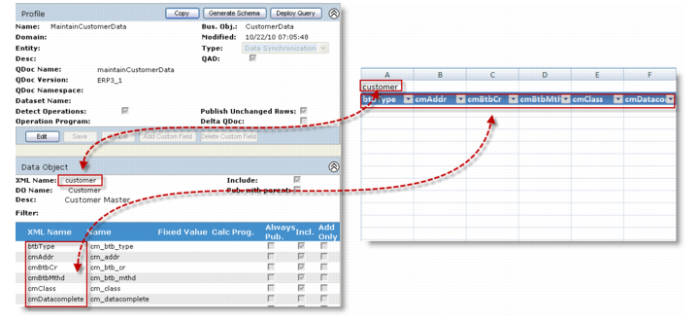
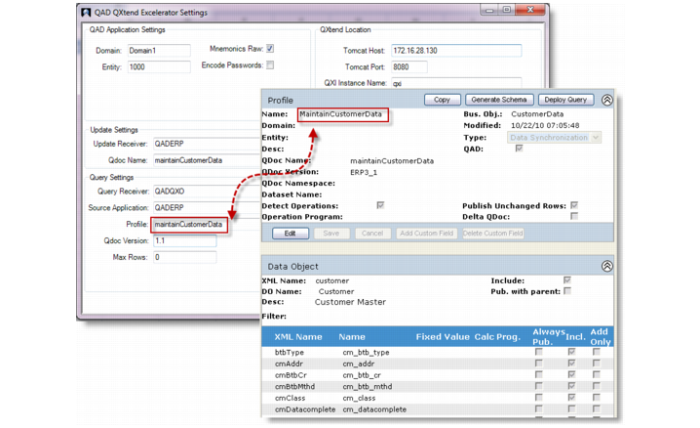
Make sure that worksheet and column header names in the Excelerator worksheet match data object and field XML names in the profile definition in QXtend Outbound and that the profile name specified in the Excelerator settings is identical to the profile defined in QXtend Outbound. All these names are case-sensitive. Map them exactly so that Excelerator knows where to place queried data into the corresponding cells in the worksheet.
Mapping of Data Object and Field Names
Mapping of Profile Names
Unhandled Exception Error
When you run into the following error message, read the details to determine the cause of the error.
An unhandled exception occurred in your application. Contact your administrator or the author of this document for further assistance
A couple of situations may cause to this error:
• If the detailed error message reads “Object reference not set to an instance of an object.”, this error is caused by a mismatch between XML names of primary key fields and the field names (not field labels in QEA) in the schema. Make sure that field names in the schema are identical to corresponding XML names.
• If the detailed error message indicates that the string is not a valid boolean value, check boolean fields in the schema to see whether they have the proper values. This error often occurs to custom fields.