Installer Limitations
Installation or upgrade does not update the startup scripts for QAD Enterprise Applications. You manually update the scripts to include the locations of the newly installed components. For example, you include the new qxevents database in the QAD Enterprise Applications database set.
When migrating the QXO database configuration, the qxevents connection details are not automatically updated in the source application to point to the new version’s qxevents database installation. Before you attempt to create any events, verify and update the connection details for each source application in QXtend Outbound.
Depending on the connection type defined for the qxevents database, the installer may be unable to connect to it. For example, if the connection specified is client-server and the server is down, the installer cannot connect to it at upgrade time.
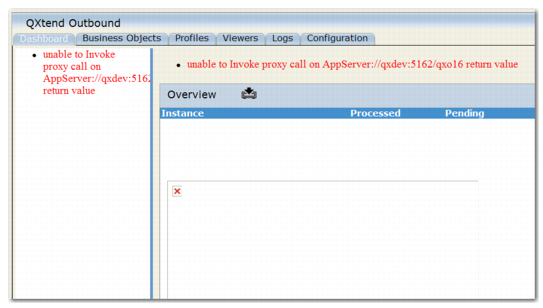
If a qxevents connection problem occurs, the Dashboard in the QXO UI does not display. The screen looks similar to
QXEvents Connection Error Indication.
QXEvents Connection Error Indication
Also these messages appear in the AppServer log for the QXO UI:
[09/04/02@14:52:42.296+1100] P-020654 T-000000 1 AS -- (Procedure: 'launchProcForSrcApps connector.p' Line:638) ** CRC for ert_app_event does not match CRC in pl-msgconsol.p. Try recompiling. (1896)
[09/04/02@14:52:42.296+1100] P-020654 T-000000 1 AS -- (Procedure: 'launchProcForSrcApps connector.p' Line:638) Unable to locate index 'XPKevt_cnt' on table 'ert_evt_cnt' for procedure 'pl-msgconsol.p'. (7967)
However, you can navigate to the Configuration tab and update the database connection details for each of the source applications.
Workarounds exist for this issue. If you experience difficulties with your installation, see
Troubleshooting QAD QXtend Installs, Upgrades, and Migrations. If you still experience problems, contact QAD Support for assistance.