Checking repository.xml
The installer keeps the installation configuration and status of all install-related tasks in the install repository.xml file.
The repository.xml file can give you a high-level view of the results of an install, particularly when doing a console install, which presents less information.
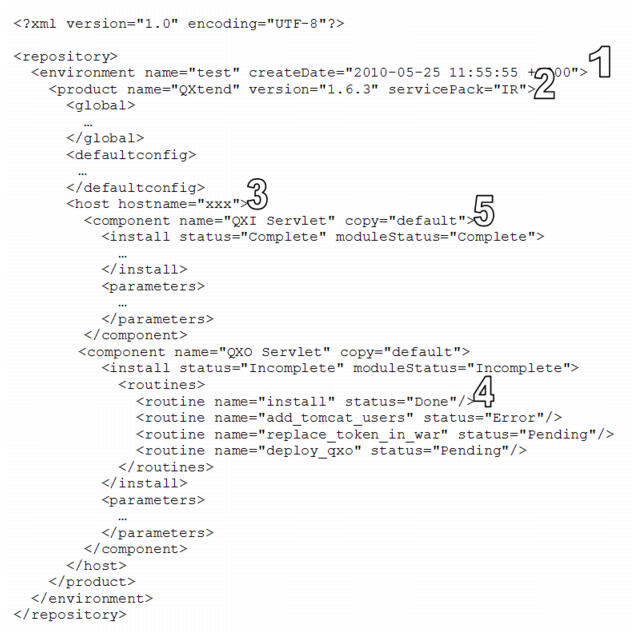
repository.xml File shows the contents of a typical
repository.xml file.
A repository.xmlfile has the following features:
1 Environment: The name attribute is the environment set during the installation.
2 Product: There can be more than one product in the environment. Verify that the name and version match the targeted install.
3 Host: There can be multiple hosts in an installation. Verify that this host is the correct one.
4 Routine: Routines are granular tasks that the installer performs. A group of routines makes up a component. Routines can have a status of Done, Skipped, Error, or Pending.
5 Component: The component node is the parent to the status and the parameters. Check the component name and proceed to observe the install or upgrade nodes.
a Status: The status of that particular component instance (indicated with the copy attribute). It can be:
• Complete if all routines are Done
• Forced Complete if any routine is marked as Skipped
• Incomplete if any routine is marked as Pending or Error
b ModuleStatus: The status of all the instances of a component. If there are three instances (indicated by copy), all three must have a status of Complete or Forced Complete before the ModuleStatus is marked as Complete.
Checking the status of a component (more specifically a routine) leads you to the installation step that failed. This functionality improves installation log navigation because you know what to look for.
The repository.xml file is located under the data directory in the QADDeployService servlet in the tomcat/webapps directory. If you are using a local file, repository.xml is in the location specified during the install.