QAD QAD QXtend 1.8.8
>
Install Guide
>
QXtend Overview
>
QAD Deployment Configuration Service
QAD Deployment Configuration Service
When installing QXtend, QAD recommends that you use the QAD Deployment Configuration Service (QDCS).
The QDCS is a repository that stores all of your deployment settings for QAD QXtend and its supporting third-party applications (Tomcat, for example) in a single place. Typically, the QDCS is stored on a network for easy access, but it can also be stored in a portable file. The QDCS is populated using the GUI installer. Therefore, access to a GUI environment is a prerequisite.
Note: If you are installing in a Linux or UNIX environment and X-Windows is not available, you must first run the installer on Windows to collect the installation information. This requirement also applies if you are installing QAD QXtend in a character environment.
There is only one repository QDCS regardless of the number of environments and/or hosts you plan to use in your deployment.
You only have to enter your deployment settings once into the QDCS for a particular configuration. The service can be reused later, for example, to move a QAD QXtend deployment from a test environment into a production environment. See
QDCS Information Hierarchy for more information.
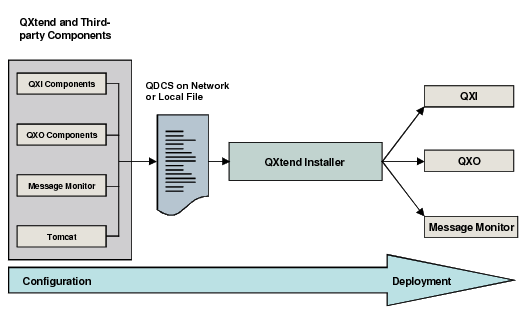
QDCS Information Flow illustrates how the QDCS works. The diagram assumes that all the QAD QXtend components and supporting third-party applications are being installed on the same host.
QDCS Information Flow
An installation using the QDCS consists of the following actions:
1 Specify the location of the QDCS: network or local host.
2 Specify the configuration file name and the environment name for the installation.
3 For each module you select to install (QXtend Adapter or QXI servlet, for example), provide the deployment configuration settings the installer requires. These settings are stored in the QDCS.
4 After you provide all of the settings for the selected components, review the installation summary before proceeding with the installation. The information stored in the QDCS guides the automated installation.
Installing QAD QXtend using the QDCS has the following advantages:
• For QAD QXtend components that share installation parameters (the location of the Progress AppServer, for example), the QDCS allows for the transfer of these settings between hosts. This functionality reduces the potential for error when entering configuration information.
• The QDCS preserves deployment data across sessions. If the installation fails, you can resume the installation from the point where it stopped without having to reenter the settings.
• Reinstallations need no further input.