Service Interface Layer
Overview
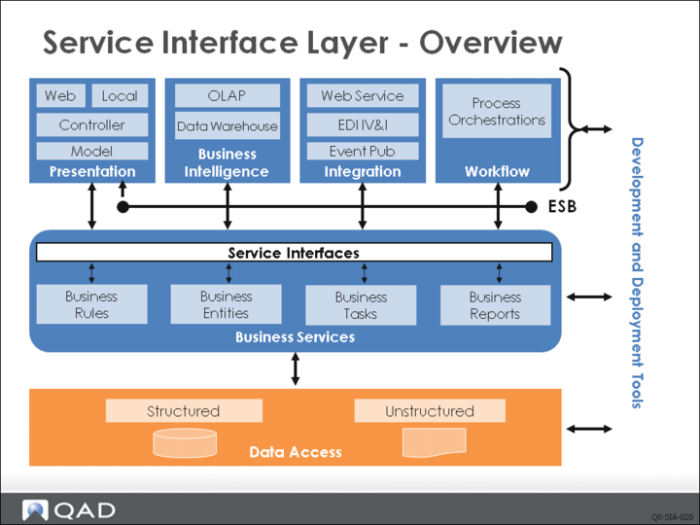
The service interface (SI) layer is a fundamental architectural concept developed at QAD. This layer is a set of common infrastructure components and a set of development standards that can be used to develop business services for any OpenEdge-based QAD application.
The service interface enables any QAD application to follow a common pattern to provide the services that are critical when developing applications that follow service oriented architecture (SOA) design principles. The common service interface enables other components such as integration platforms, user interface toolsets, or reporting tools to access your services in the same way without having to understand the underlying implementation of the service.
The service interface layer provides infrastructure and standards used in QAD application development to ensure that any external business services (APIs) follow a common pattern to expose those services. Previously, QAD application development teams have taken different approaches when developing APIs, resulting in inconsistent APIs and different interoperability tools and standards. The service interface ensures that OpenEdge development teams use common standards to develop APIs, creating a single set of interoperability tools and services.
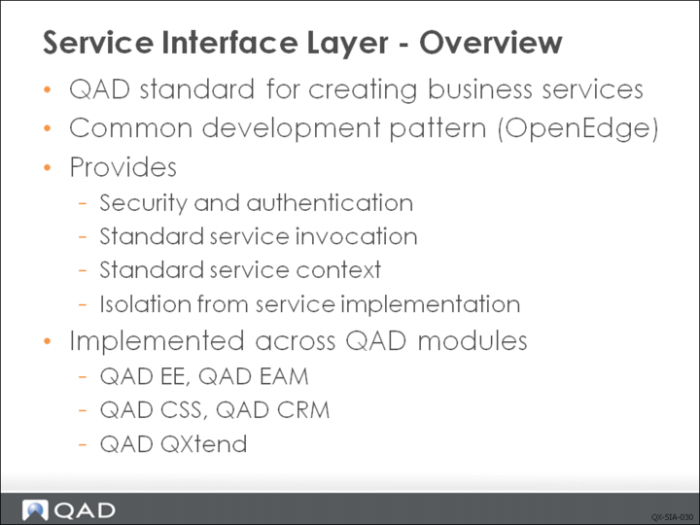
Key features handled by the service interface include:
• Security and authentication: These services are common to any application and—of course—different applications implement these services differently. The service interface defines a common interface that is implemented by any application that uses it for security and authentication-related actions. The service interface layer does not provide the implementation--that is the job of the application team. The application implements the interface and connects the service interface to its security and authentication services.
• Service invocation: A common API invocation layer is provided that is responsible for invoking the application service for external components. The generic service invocation requires that the API called from the service interface follows a set standard and interface. The advantage of having a common invocation component is that external applications only have to be able to invoke services through the service interface, which means that one component can call any service implemented using the service interface
• Service context: Requests to any service need to carry context information—such as user, domain, and other application-specific information—to determine how to process the request. The service interface defines a standard for this and provides methods to access request context information. Service context is critical so that we can work with stateless and state-free AppServers, and therefore scale the AppServer pool. In effect, we manage our session state, rather than having OpenEdge do it for us.
• Isolation: The overall goal of the service interface is to provide common components that isolate the caller from the implementation details of the target application/API.
The service interface is already used or under development with several QAD Enterprise Applications. The Enterprise Edition Financials has been developed with a complete SOA infrastructure, and provides access to the Financial APIs via the SI. QXtend also has APIs implement the SI; products such as EAM, CRM, DOM, and CSS all implement the SI. The number of applications that implement the SI will continue to increase.
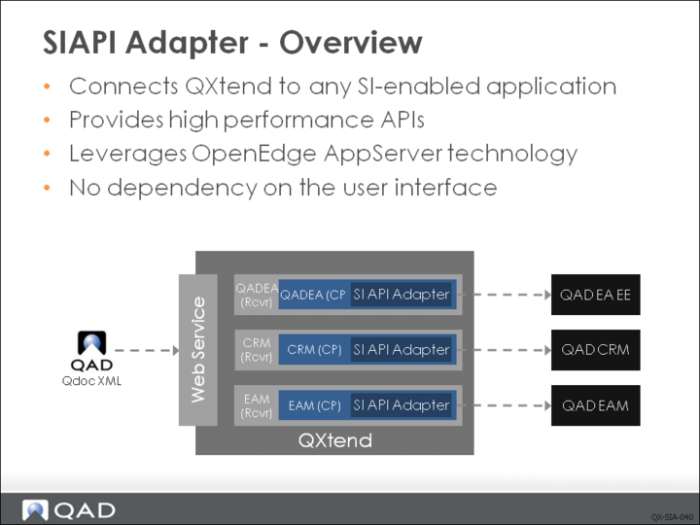
The service interface (SIAPI) adapter in QXI leverages the standard service invocation features of the SI layer to provide an adapter that can process requests to any business application service that has been implemented using the SI layer. The advantage of using the SIAPI adapter is that no additional QXtend development work is required to support new SI-enabled applications.
The APIs that are provided via the SIAPI differ fundamentally from the UIAPI adapter: the APIs are pure business logic and do not depend on the UI. Executing business logic without the UI greatly improves the performance of the API and enables many more messages to be processed.
The configuration of the SIAPI adapter connection pool also differs from the UI API. The primary difference is that messages are processed using an OpenEdge AppServer instead of data being passed through a telnet connection. Configuring the connection pool requires you to enter details about the AppServer instance that is going to execute requests.
Service Interface Adapter
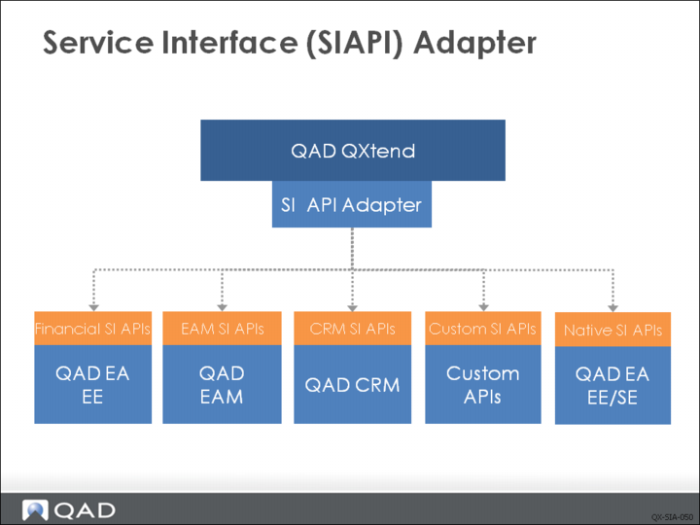
The SIAPI adapter allows you to add new SI-enabled applications to QXtend easily. Four or five applications either already use the SI or will do soon; this number will increase. As these QAD applications appear, their APIs will be accessible from QXI, allowing a common application-to-application integration methodology across all QAD products.
Customers and services can develop custom APIs that implement the SI; those custom APIs will be available through QXtend, and the same applies for QAD application partners.
Configuring the SIAPI
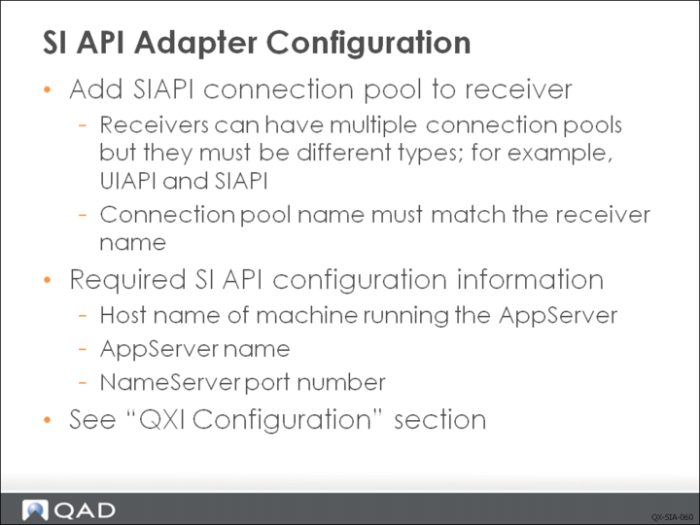
Configuring the SIAPI adapter is described in the section “QXI Configuration” in this guide. An SIAPI pool can be added to any receiver set up within QXI. However, receivers can only be connected to one connection pool for each adapter type--two SIAPI connection pools cannot be added to a receiver. A common configuration for QAD EA EE is for a receiver to have a UI API connection pool for the operational APIs, and an SIAPI connection pool for the Financial APIs. When creating a second connection pool for a receiver, the connection pool name must be identical to the name of the receiver.
When you configure a SI API connection pool, you need the following information to connect to the AppServer:
• Host: Name or IP address of the machine that is running the AppServer instance you want to connect to.
• AppServer: Name of the AppServer configured to accept service interface requests.
• Port: Port number of the NameServer that the AppServer is registered with.
For details on creating an SI API connection pool, see
Connection Pools.
Enterprise Financials Inbound Integration
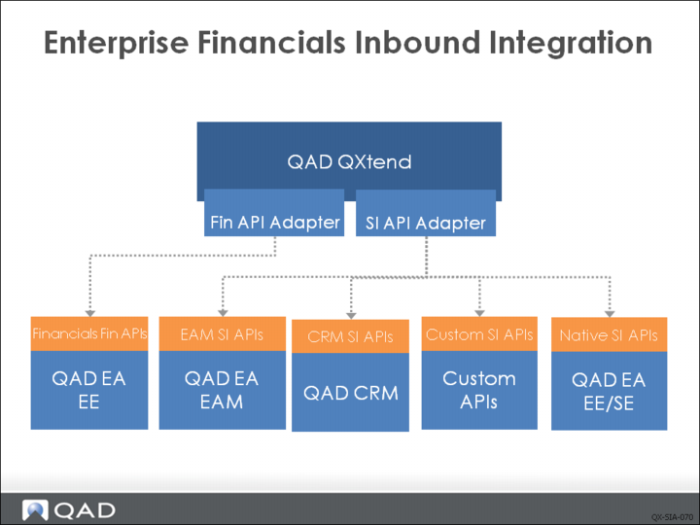
The Enterprise Financials module in QAD EE now follows the latest development standards. The result is an SOA-enabled application and several services that have no dependence on the UI. The service interface is also supported by the new Financials, meaning that you can use the services available on the Financials business components with QXtend.
The Fin API is one kind of SI API but for QAD Enterprise Financials. For QAD Enterprise Application, the Fin API adapter calls Financials AppServer (only available in QADEE) and SI API adapter calls Native API AppServer (available in both QADSE and QADEE). The main reason we use the name Fin API is that for each receiver, only one connection pool can be defined for each type of adapter.
Configuring SIAPI in Enterprise Financials
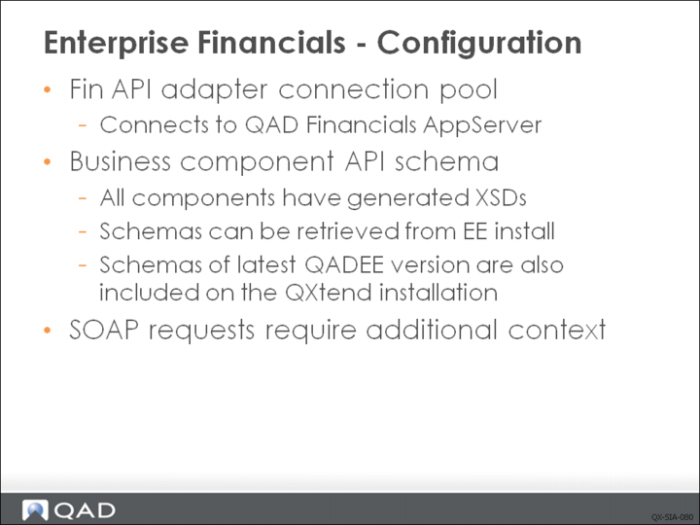
QAD QXtend leverages the SI support of the new Enterprise Financials to access to the Financials APIs through the Fin API adapter. A Fin API connection pool must be created that connects to the Financials AppServer.
Currently QXtend includes most of latest schemas for Financials but you can retrieve the schema from EE install as well. For example, Qxtend 1.7.1 was released together with QAD 2011 EE so it includes schemas for QAD 2011 EE Financials components. However, if you want to use QXtend 1.7.1 with QAD 2010 EE, please retrieve the schemas from QAD 2010 EE install.
Loading a Schema into Enterprise Financials
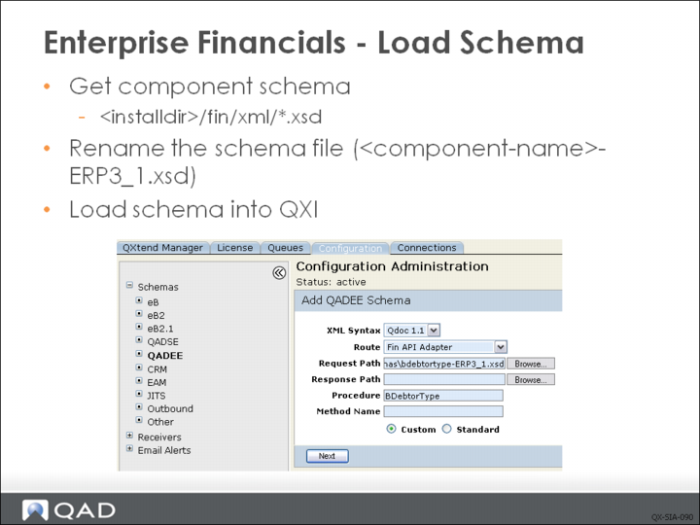
To use one of the supported Financials business components with QXtend, you must manually retrieve the schema and load it into QXtend by doing the following:
1 Get schema. The schema files for the business components are located in the Financials instance in the directory <qadee-installdir>/fin/xml. The schema naming convention is <component-name>.xsd. Locate the schema for the component you need and copy it locally.
2 Rename schema file. QXtend requires the API schema to follow a different naming convention: <api>-<version>.xsd. The schema file copied from the Financial installation must be changed to <component-name>-ERP3_1.xsd.
3 Load the schema file for the component into QXtend using the Schemas section of QXI. Add a new schema to QADEE. When you add the schema, you need to supply the following values:
XML Syntax
For all EE financial APIs Qdoc 1.1 syntax must be used.
Route.
All EE financial APIs are accessed through the Service Interface, choose “Fin API Adapter” for the route.
Request Path.
The path to the renamed XML schema. The path must be accessible from the local machine.
Response Path.
The path to the response file for the API. Typically Financial APIs1 do not have response schemas so this can be left blank. However, future releases of QAD EE may provide response schemas for the APIs, and these should be loaded if provided.
Procedure.
Used by the service interface to determine the business component to load data into. Enter the name of the business component; for example, BDebtorType.
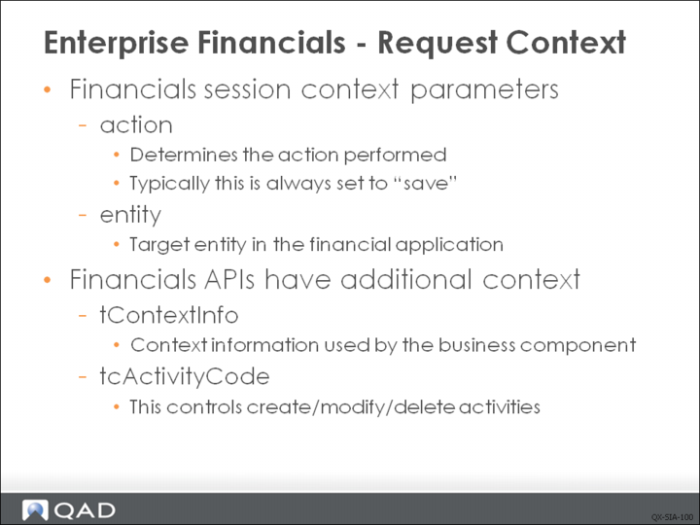
Enterprise Financials - Request Context
Requests to any of the Financials APIs require additional context information. Context information controls how the request is processed by the API. The additional context information has two types. The first type is passed as an SI session context entry in the ttContext table; the other type is passed in the request business component data as part of the tContextInfo. These are new parameters that are only required for requests being processed by a Financials API.
SI Session Context (ttContext)
• Action: Tells the SI that the action must be performed against the business component once the transaction has been processed. If the API being used is maintaining data, the “save” action must be specified to ensure that any changes processed by the API are committed.
• Entity: Defines the entity that the data in the request will be loaded into. This parameter is similar to the domain parameter for other QAD EA requests. The service interface will switch to the specified entity before processing the request.
Business Component Context Information (tContextInfo)
• tcActivityCode: Every request to a Financials business component must include context information. When processing an API request, the tcActivityCode is the most important as it defines the activity being performed against the business component. The standard maintenance APIs use one of the following values: create, modify, or delete. This has the same function as the operation node in non-Financials API QDocs.
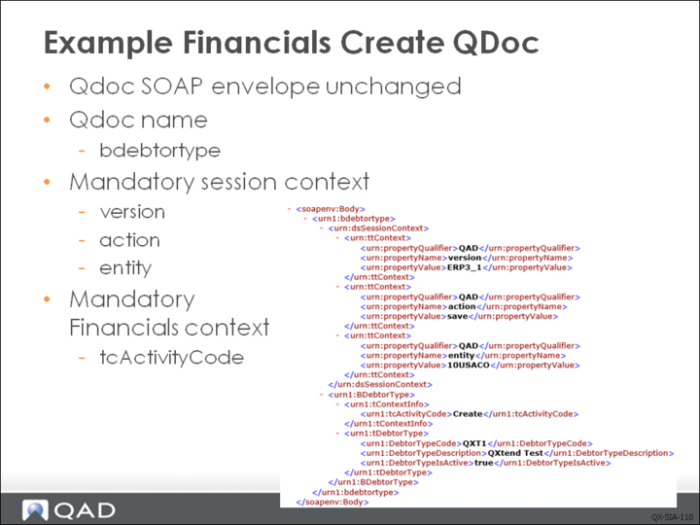
Examples
The above example QDoc message shows a create QDoc for the BDebtorType business component. The QDoc SOAP envelope is not changed when calling a Financials API. The QDoc name is always the name of the Financials component being updated. In the example this is the <urn1:bdebtortype> node.
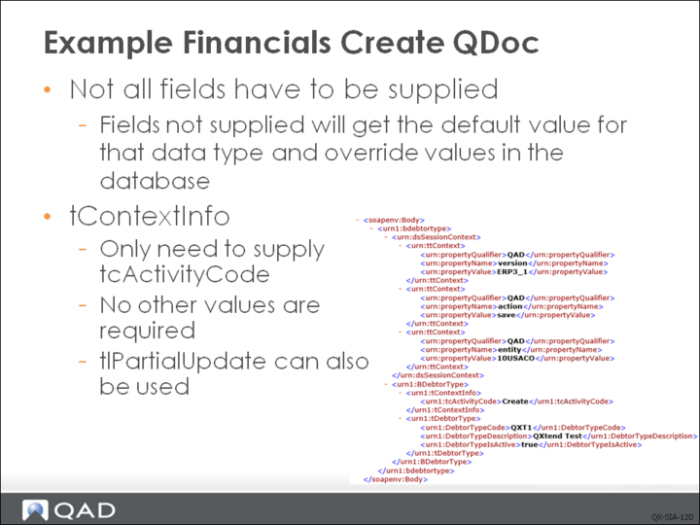
The Financial business components have many fields, but not all of them are required when using the QXtend API. Fields that have default values in the application can be omitted from a create request and will be assigned the default value for the API. Some other fields also can be omitted:
• *_ID fields: Implementing the Financials business components uses ID values to uniquely identify records within a table. These values are then used for primary keys, foreign keys, and parent-child relationships. However, ID fields provide internal information that is not intended for consumption by external applications. Instead, business keys (customer number, invoice number, and so on) are used. When calling a Financials API from QXtend, ID fields can be omitted from the request and the business keys provided instead; this helps the external system to create the request. Essentially the ID fields are not used by the QXtend API.
• Custom* fields: The custom fields store field values that are added to the Financials application through the customization framework. Only fields used for customizations need to be provided.
• LastModified* fields: These fields are updated automatically by the Financials API and are not required as part of the request.
tlPartialUpdate is used in update. If tlPartialUpdate is set to true, then during the update, system will keep the original value for fields that do not have a value supplied in request. By default tlPartialUpdate is set to true.