Financials Event Setup
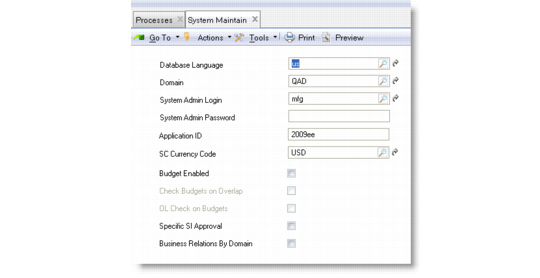
This section describes how to configure Financials to publish events to QAD QXtend.1 Set the Application ID in System Maintain (36.24.3.1). The application ID value should be the same as the source application name configured in QXO.
System Maintain (36.24.3.1)
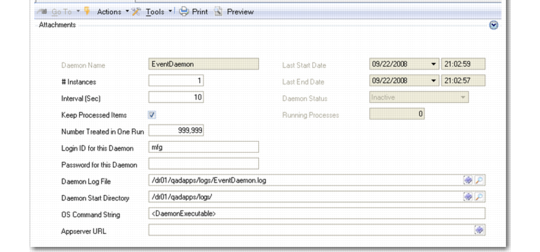
2 Configure the Event Daemon using Event Daemon Configure (36.14.16.16.1). Otherwise, the Event Daemon cannot be started.
Event Daemon Configure
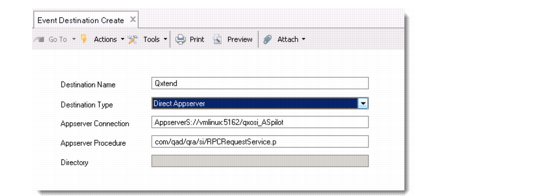
3 Record the location of the QXtend AppServer in Event Destination Create (36.14.16.14.1).
The AppServer protocol depends on the connection between the AppServer and the connection pool. See
AppServer Protocols for the protocols.
AppServer Protocols
Direct Connection | Secure Connection | AppServer Protocol |
No | No | AppServer://<host name>:<NameServer port>/<AppServer name> |
Yes | No | AppServerDC://<host name>:<AppServer port>/<AppServer name> |
No | Yes | AppServerS://<host name>:<NameServer port>/<AppServer name> |
Yes | Yes | AppServerDCS://<host name>:<AppServer port>/<AppServer name> |
4 In the AppServer Procedure field of Event Destination Create, specify the RPCRequestService.p procedure. This is the general service interface dispatcher.
Event Destination Create (36.14.16.14.1)
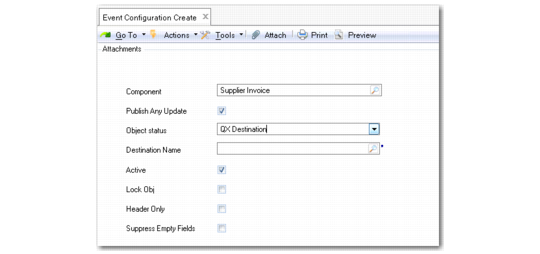
5 In Event Configuration Create (36.14.16.15.1), select the component and then select the Publish Any Update check box.
Note: If the workspace has changed, an Event Configuration record must be created for the new workspace.
6 Specify the destination previously created in the Destination field.
Event Configuration Create (36.14.16.15.1)
7 Start the Event daemon using Event Daemon Start (36.14.16.16.4).
8 Change a record on an existing supplier invoice using Supplier Invoice Modify in Financials.
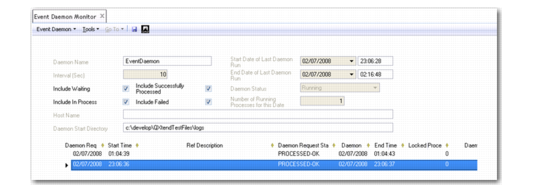
9 Open the Event Daemon Monitor to view the event generated in Financials when you modified the supplier invoice.
Event Daemon Monitor (36.14.16.16.2)
10 Open Supplier Delete (28.1.1.9) and delete a supplier record.
11 Open Event Daemon Monitor.
Create, modify, and delete activities can generate a published event from Financials.