DOM Builder and Q/LinQ
The DOM Builder is a general-purpose API that is not part of Q/LinQ. However, it can easily be used in conjunction with the Q/LinQ publishing API to publish QDocs and other XML documents for outside applications. In Q/LinQ publishing scenarios, the DOM Builder methods would be called to create the desired XML object and serialize it into the records of a temp-table. The resulting temp-table would be passed to the qqPublishXMLDoc method of the publishing API. See Technical Reference: QAD Q/LinQ for details on Q/LinQ APIs.The following partial code sample illustrates how the two APIs can be used together. Also, the Q/LinQ program responsible for creating QDoc confirmation documents, qqsndack.p, is a good working example.Use of the publishing API consists of a single call to qqPublishXMLDoc, but requires that the XML document be built beforehand using the XML capabilities of the Progress 4GL. It accepts an X-DOCUMENT handle to an XML document, and serializes it into the Q/LinQ export queue./*
* Use Progress XML DOM object support to build your XML document. If
* possible, call the DOM Builder methods to create the XML data and
* store it in a handle. The key methods are createNewXMLDocument,
* createNewQDoc, addNodeGroup, addRecordNode, addNode,
* addAttributes, getXMLAsTempTable.
* /
{pxrun.i
&PROC = createNewXMLDocument
&PARAM = “(
...)”
&HANDLE = domBuilder
&CATCHERROR = true
}
{pxrun.i
&PROC = addNode
&PARAM = “(
...)”
&HANDLE = domBuilder
&CATCHERROR = true
}
...
{pxrun.i
&PROC = getXMLAsTempTable
&PARAM = “(input (buffer exportDoc:handle))”
&HANDLE = domBuilder
&CATCHERROR = true
}
/*Set the document type and other control information*/
/*Populate the input parameters for qqPublishXMLDoc*/
/*Call internal procedure to create document log*/
…
{pxrun.i
&PROC = qqPublishXMLDoc
&PARAM = “(
...)”
&HANDLE = domBuilder
&CATCHERROR = true
}
/*Delete the completed document to reclaim memory resources*/
{pxrun.i
&PROC = deleteDocument
&HANDLE = domBuilder
&CATCHERROR = true
}
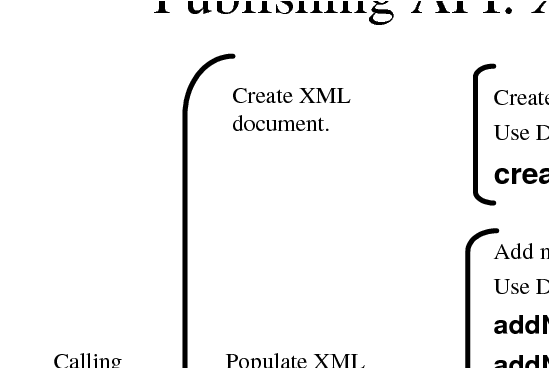
If the qqDocPublished output parameter contains a value of true, the publishing API call executed successfully. Otherwise, an error occurred and the XML document could not be published. Publishing API Adapter Logic for XML Documents illustrates the logic of publishing in XML format.
Publishing API Adapter Logic for XML Documents