Domain Setup Work Flow
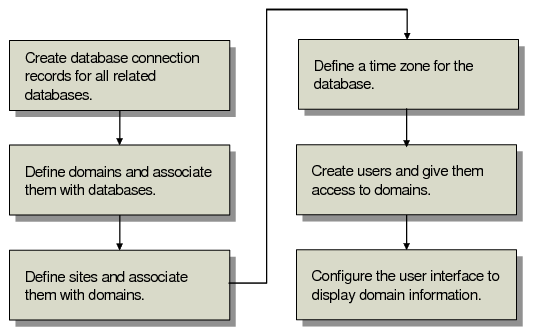
Domain Setup Work Flow illustrates the steps required to set up domains in a database.
Domain Setup Work Flow
1 Identify each database in Database Connection Maintenance (36.6.1) and define its location and connection parameters. You must create a record for the working database even when you are not using multiple databases. See
here.
2 Create domains in Domain Maintenance (36.10.1) and associate them with databases. Domain names should be unique across connected databases. See
here.
3 Assign each site to the appropriate domain in Site Maintenance (1.1.13). See
here.
4 Define a time zone for the database in Database Control (36.24). See
here.
5 Create users and give them access to domains in User Maintenance (36.3.1). See
here.
6 Configure settings that affect the display of domain information on the user interface using Security Control (36.24) and Program Information Maintenance (36.3.21.1). See
here.