Field Validation
Before entering a list of generalized codes for a field, you must know the field’s name and size. In the Windows and character interfaces, a pop-up window displays information about the field when you press Ctrl+F with your cursor in the field. If this information indicates generalized codes validation, the system automatically verifies data entered in the field against the list of generalized codes.
You can also use Generalized Codes Validation Report (36.2.15) to view a list of all fields in the database that have schema validation assigned. This is the preferred method in the QAD .Net UI and Desktop interfaces.
Note: The system performs validation only when generalized codes have been defined for a field.
Example: You have divided your customers into regions. The cm_region in the customer master is updated by Customer Maintenance (2.1.1). As part of the implementation process, you assign each customer to one of two regions. To ensure that only standard region codes are used, define them as generalized codes. Specify cm_region for the field name, the values US and X-US for the two regions.
Adding Generalized Codes
Generalized Codes Maintenance (36.2.13) illustrates Generalized Codes Maintenance (36.2.13).
Generalized Codes Maintenance (36.2.13)
Specify a field name and then enter valid values and comments. Values cannot exceed the length of the field. The comment displays next to the value in the lookup.
Adding a Lookup
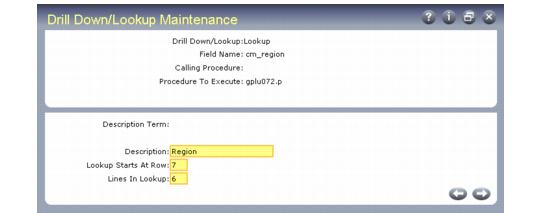
To set up a lookup to display generalized codes, use Drill Down/Lookup Maintenance (36.20.1). Enter the field name where you want the lookup and gplu072.p as the procedure to execute.
This program creates the lookup with values from the assigned field. If the lookup should only be accessed from a particular screen, enter that program name as the calling procedure.
Drill Down/Lookup Maintenance (36.20.1)
The description defaults from the data dictionary, but can be changed here. If no description exists, the field name is a local variable. The description displays as the title of the lookup.
Adding Validation
Generalized code validation, like field security, requires a special validation expression in the database dictionary that references the file gpcode.v.
Some fields already reference gpcode.v. These display in the Generalized Codes Validation Report. If you want to activate generalized code validation for other fields, you must change the data dictionary.
You can do this directly using full Progress or, if you have encrypted source, you can use the utility utdbfx70.p. Once you have added a validation expression, you must recompile the affected programs. For instructions on how to do this, refer to the Progress Programming Handbook.
To add validation for a local variable, you must insert the validation directly in the source code.
Important: If you change the data dictionary, keep careful records and be prepared to repeat the change when new product versions that update the data dictionary are installed.