Basic Login Security
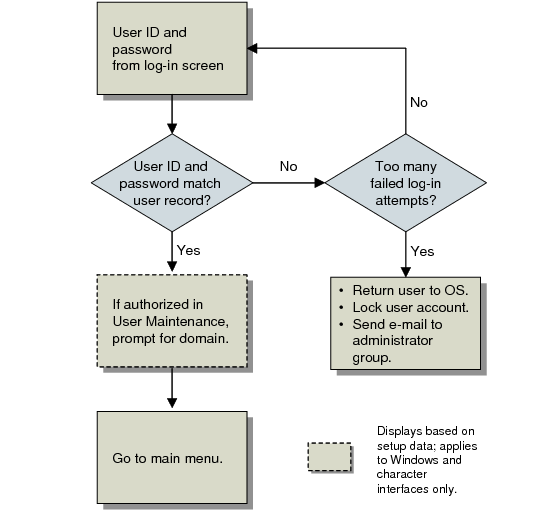
Typically, a user must enter both a user ID and a password to log in. If the user enters an invalid combination, the system may prompt additional times—based on the value of Maximum Access Failures in Security Control. After the specified number of failures, the user is returned to the operating system, the user account is deactivated, and members of the system administration group are notified by e-mail. The sending address of the e-mail includes the operating system ID of the user who attempted to access the system.
Log-In Validation illustrates how this process occurs during log-in.
Note: To completely or partially bypass log-in security, you can configure the system to allow users to access the system based on operating system user ID. See
OS-Based Log-in Security.
Depending on the setting specified in Security Control, the system maintains historical records of successful and failed log-in attempts. Use Logon Attempt Report (36.3.23.1) to view log-in history.
Note: In order for the time zone to be properly recorded during log-in and password change, the server time zone must be specified in Database Control (36.24). See
Setting a Default Time Zone.
Log-In Validation
This type of log-in security lets you:
• Unless you choose to control access from the operating system level, effectively separate application security from the operating system security. The application user ID does not have to be the same as the user ID referenced by UNIX or Windows. See
OS-Based Log-in Security.
• Provide an extra level of security from unauthorized users. An individual can gain access to an operating system user ID by breaking into the system or stealing a password. Requiring a different user ID and password combination to access the QAD application presents an additional barrier to an unauthorized user.
• Track unsuccessful log-in attempts to identify possible unauthorized efforts to access the system.
To provide maximum security, the system does not save log-in related data from session to session. User interfaces typically require users to enter both a valid user ID and a password at each log-in unless you choose to control access directly from the operating system level.