Specifying Domains
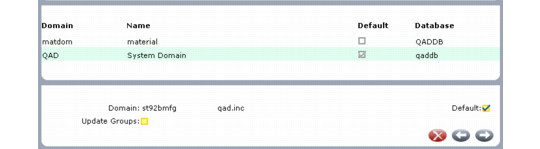
Use the domain frame to enter or update the domains to which this user has access. If you specify more than one domain, identify the one the system uses as the default at log-in. Additionally, you can enter or update the user groups that control security access for the user while in this domain.
User Maintenance, Domain Frame
Domain
Enter the code identifying a domain this user can access. The domain name displays next to the code.
The functions that the user can execute in this domain are determined by access granted to the groups associated with the user in this domain. Set Update Groups to Yes to enter or update the list of user groups associated with this user in this domain.
Default Domain
Enter Yes if this is the user’s default domain; otherwise, enter No. This field defaults to Yes for the first domain assigned to a user.
Note: In a multiple-database environment, a user’s default domain must be associated with the current database; it cannot be a connection record.
When a user logs in to a QAD database, the system retrieves the information associated with the user in User Maintenance. In the character and Windows UIs, a user with access to more than one domain is prompted for a domain code, which defaults from the record marked as default.
A user with only one assigned domain does not see this prompt at log‑in but is automatically logged in to the single domain associated with the ID specified.
Only one domain can be designated as default. When you enter Yes, the system verifies if another default domain exists for the user. If it does, a warning displays and you are prompted to continue. If you choose to continue, the current domain becomes the default and the system no longer uses the other domain as the default during log-in.
You cannot exit this frame without assigning a default domain to the user. An error is generated and you are prompted to continue. If you continue, any changes made in the current session are discarded.
A user with access to multiple domains can use Change Current Domain (36.10.13) to switch to another domain at any time during a session. Otherwise, all session activity takes place in the domain specified at log-in.
Update Groups
Enter Yes to display a frame that lets you enter or update the list of user groups associated with this user in this domain. Groups are required only if you control security access by group. Set this field to No to skip the group frame for this domain.
Note: You also can associate users with groups in each domain in User Group Maintenance (36.3.4). See
Defining User Groups.