User Group Example
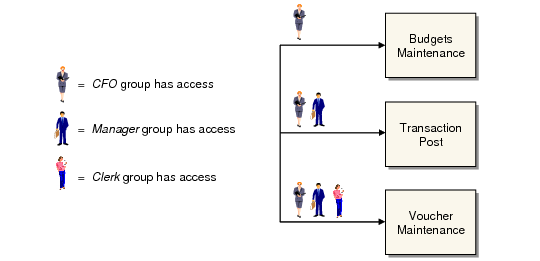
In this example, the system administrator employs user groups and menu security to control access to three functions based on each employee’s organizational level.
Company A wants to provide three levels of access to accounts payable (AP) functions: one for clerks, one for managers, and one for the CFO.
The system administrator creates three groups in User Group Maintenance: Clerk, Manager, and CFO. Sara, the AP Clerk, is added to the Clerk group. Don, the AP Manager, is added to the Manager and Clerk groups. Helen, the CFO, is added to all three groups. In this setup, Helen’s group membership grants her entry to all the levels she is authorized to access.
Using Groups to Give Access
Sample Group Setup shows how the system administrator sets up user access for each group in User Group Maintenance.
Sample Group Setup
Group | User |
Clerk | Sara |
Manager | Don |
CFO | Helen |
Next, the administrator uses Menu Security Maintenance (36.3.10) to grant each group access to the appropriate programs.
When Mark is hired as the new deputy CFO, the system administrator only has to assign Mark to the CFO group—rather than using Menu Security Maintenance to give the new user access to each individual protected AP function.