Control Entity Access
When entity security is in place, only authorized users can complete update transactions in the General Ledger module for particular entities. Update transactions include:
• Transaction maintenance
• Posting
• Consolidation
• Export and import
• Budget maintenance
• Opening and closing fiscal periods
Entity security also affects the following programs in other modules:
• Debit/Credit Memo Maintenance (27.1)
• Payment Maintenance (27.6.4)
• Voucher Maintenance (28.1)
• Voucher Confirmation–Automatic (28.6)
• Voucher Confirmation–Manual (28.7)
• Cash Book Maintenance (31.13)
• Fixed Asset Transaction Post (32.13)
• Fixed Asset Transaction Void (32.14)
• Fixed Asset Retirement (32.19)
All users can still enter maintenance functions or run inquiries and reports. To control access to a screen, you must use menu security.
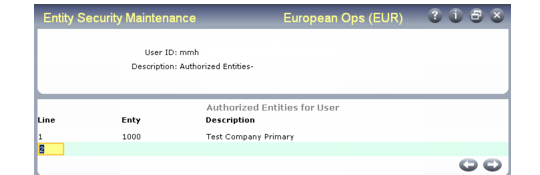
Once you define entity security for one user and one entity, it applies to all users and entities. Each user must be set up individually. To give a user access, enter the user ID and list of entities, as shown in
Entity Security Maintenance (36.3.13).
Note: Entity security cannot be defined for groups.
Entity Security Maintenance (36.3.13)
An asterisk in the Entity field indicates that a user can access all entities.
Important: For a user to create a new entity, they must have access to all entities (*).