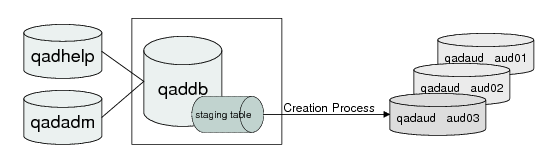
Audit Trail Data Flow
Audit trail functions use a separate database (qadaud) to store the audit trail data. These records are linked to records in the standard database (qaddb) by the unique object ID associated with the records.
Audit data is initially saved in a staging table in qaddb. The audit trail creation process then moves audit data from the staging table and commits it to the audit database. It uses the data defined in Audit DB Maintenance to determine which database to connect to as well as the required connection parameters.
Audit Trail Creation Process Data Flow
In
Audit Trail Creation Process Data Flow, three audit databases are displayed. As part of implementation planning, each company must determine how frequently a new audit database needs to be brought online based on sizing requirements. The size of the audit database depends on the number of tables you decide to audit and the number of changes to records in those tables.
While only one database is updated at a time, you can generate reports for records stored in any number of audit databases.
See the installation guide for guidelines to consider when planning database sizing.
The audit trail creation process can be started automatically by the system administrator using a custom startup script. It can also be started using Audit Trail Creation Process (36.12.13.23). If your environment generates large amounts of audit information, you can run multiple processes.
The creation process runs constantly in a dedicated session, commonly referred to as a background process. It continues to commit data generated prior to 12:00 AM (midnight) until all records for a specific day have been committed to the current audit database. Once it finishes committing data for the day, the system reviews database connection records and connects to a new database if required, based on the database active date setting. It then continues recording activities for the new day.
If the creation process cannot connect to the audit database using the connection records defined for the current day, an e-mail is sent to the system administrators and a message is written in the audit log file. Audit data continues to be stored in the staging table in qaddb, ensuring that no auditable events are missed. Once the audit database becomes available, the Audit Trail Creation Process commits the saved data to it.
Important: System administrators should monitor the log file to ensure the audit update process is running successfully. Certain error conditions do not generate an e-mail message; for example, a server crash.
When delete event data is committed, as an additional safety measure, the system verifies the key field data. In the rare event that the validation fails, the audit data is automatically stored in a backup audit error table. An e-mail is generated notifying the administrator group of the problem. The problem data must be manually corrected by the system administrator. Contact the QAD Support organization for assistance in performing this task.