Routings/Work Centers
This chapter discusses the elements associated with routings, including departments, standard operations, and work centers. Many of these concepts are also common to process definitions.
Introduction to Routings and Work CentersDescribes how routings can be used and summarizes how to set them up.
DepartmentsExplains how departments and accounts work and lists different department account types.
Work CentersExplains what work centers are and how to set them up using Work Center Maintenance (14.5).
Standard OperationsDefines standard operations, explains how they are used effectively, and describes how to set them up in Standard Operation Maintenance (14.9).
RoutingsOutlines what routings are and explains how to set up and maintain them with Routing Maintenance (14.13.1), including details on alternate routings, work center routing standards, and routing cost roll-up.
Lead TimesLists and describes how lead times are expressed for operations manufacturing, including extra information on manufacturing lead time and how it is calculated and used.
Subcontract OperationsDescribes how subcontractors can be used and how to configure the system to handle them.
YieldExplains the types of yield which are handled by MRP and how yield percentage and operation-based yield are used.
Introduction to Routings and Work Centers
To manufacture an item or product, you must complete one or more activities or operations. The list of required operations is called a routing, which basically defines the process needed to make the item. If a product structure is the list of ingredients in a recipe, a routing is the directions. The routing operations indicate the machines, expected times, and instructions for completing specific tasks.
For example, in manufacturing sunglass lenses, there might be a routing with four operations with instructions to grind, polish, tint, and coat the lenses. These would be separate operations because they involve different machines, tools, skills, and tasks.
In the Shop Floor Control and Repetitive modules, you record actual statistics on what happens during production. This might include how long it takes to produce items, what quantities are produced and by whom, whether there was downtime or some other interruption to production, and so on. These statistics are always recorded against a routing operation.
Note: Routings are required if you use the Repetitive module.
In addition to providing manufacturing instructions, routings contain data used as a standard for evaluating production, operation times, yield percentages, the number of machines normally needed, and so on. The department and work center codes associated with routing operations link actual production results with capacity planning, cost accounting, and other programs.
Specifically, routings can be used to:
• Calculate the cost of producing an item.
• Calculate the time it takes to manufacture an item.
• Schedule operations for work orders and repetitive schedules.
• Backflush components in the Repetitive module.
• Calculate work center and department load.
• Print routings for work orders.
• Obtain operation feedback using programs in Shop Floor Control, Repetitive, and Advanced Repetitive.
Some of these capabilities are especially important when there is a combination of medium to long operation lead times, a significant labor component of cost, many operations, and bottleneck operations.
Routing operations may not be necessary when:
• Item lead times are very short.
• Total item costs consist mostly of material and overhead and the labor component is relatively small.
• Capacity can be easily managed.
• Repetitive module is not used.
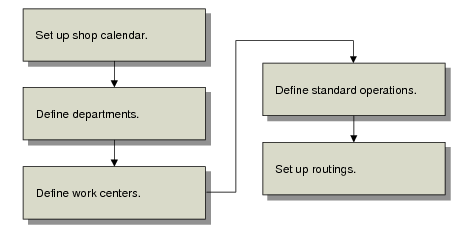
Routing Setup Work Flow summarizes the steps required to set up routings.
Routing Setup Work Flow
Important: Work centers and operations work in conjunction with the shop calendar, which determines the work days and hours for the plant. Use Calendar Maintenance (36.2.5) to add work center-specific calendars. Before you begin defining the elements needed to create routings, make sure you set up the shop calendar. See User Guide: Manager Functions for more information on calendars.