Setting Up Flow Production Lines
Use Production Line Maintenance (17.21.1.4) to define a production line at a specific site that will be used to manufacture items according to quantities and sequences specified by flow schedules.
Flow Schedule Maintenance uses the information from this program, along with information from Schedule Code Maintenance, to calculate production capacity and other data that can be used to analyze whether the production line can meet current and upcoming schedule requirements.
Important: Flow production line records are stored in the same table as production lines used by the Repetitive, Advanced Repetitive, and Operations Planning modules. However, the records created with this program include some data used only in flow scheduling. For example, flow rates defined here apply only to flow schedules.
Delete existing production line records by pressing Delete when the cursor is in any field below the Production Line field. Before deleting the record, the system verifies that the production line is not used by a schedule in the Flow Scheduling, Repetitive, or Operations Planning modules. The system deletes schedule code detail records associated with the production line.
Note: If you have also defined this production line in the Repetitive or Advanced Repetitive module, that production line record is not affected.
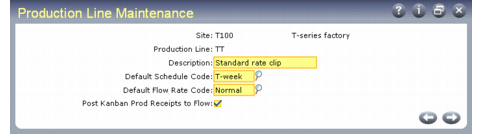
Production Line Maintenance (17.21.1.4)
Site
Enter an alphanumeric code representing the site where this production line is located. This site must be defined in Site Maintenance. You must have security access to the site, and it must be in the current database.
Line
Enter an alphanumeric code for a production line used for manufacturing flow-scheduled items.
Description
Optionally enter an alphanumeric description of this production line. Some programs, including reports and inquiries, display this description when you enter the production line code.
Default Schedule Code
Optionally enter a default schedule code for this production line. This value must be defined in Schedule Code Maintenance.
If you enter a value, it defaults to the Schedule Code field when you create a new schedule for this production line in Flow Schedule Maintenance. Otherwise, that field is blank. Additionally, when you use Production Line Item Maintenance to identify items that can be produced on a flow production line, that program gets the default unit of measure from the default schedule code.
In Flow Schedule Maintenance, flow schedule codes are used to convey basic data about a flow schedule, including such information as periods, start dates, and unit of measure data.
Default Flow Rate Code
Optionally enter a default flow rate code for this production line. If you enter a value, it is validated against codes entered in Generalized Codes Maintenance (36.2.13) for field flcr_rate_code.
If you enter a valid value, it defaults to the Flow Rate field when you create a new schedule for this production line in Flow Schedule Maintenance. Otherwise, that field is blank.
In Flow Schedule Maintenance, flow rate codes are associated with a specific production rate on a specific production line.
Post Kanban Production Receipts to Flow
Indicate whether production receipts recorded using Kanban transactions are also recorded as completions for flow scheduled orders on this production line.
No: Kanban production receipts are not recorded as flow schedule completions.
Yes: When you record a production receipt in Execute Kanban Transaction (17.22.19.1) with an effective date that corresponds to a flow schedule due date for the item, the system updates the Completed field on the flow scheduled order with the quantity received.
See User Guide: Kanban.
When more than one order is available to record completions, the system applies the same logic used when you receive completed quantities in Flow Schedule Receipts (17.21.7).
Note: When this field is Yes, the system applies completions only to flow scheduled orders that do not reference an existing, non-type W work order.
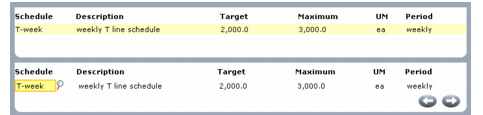
Optionally, you can associate target and maximum production flow rates with specific schedules when they are referenced in Flow Schedule Maintenance on a schedule for this production line. When you complete basic data entry in the first frame and press Go, the system prompts you to modify schedule code detail. Specify Yes to access another data-entry frame for entering flow rates. A frame displays existing production line records. Use the bottom frame to update these or enter new records.
Note: You can also associate flow rates with production lines in Schedule Code Maintenance.
Production Line Maintenance, Schedule Code Detail Frames
Schedule
Enter a flow schedule code to be associated with this production line. This must be defined in Schedule Code Maintenance.
When you enter a valid value, the system displays the description and rate expression defined for the code in Schedule Code Maintenance. You can then specify target and maximum production rates for this production line.
Target
Enter the optimum number of units produced by this line during the schedule period when it uses this schedule code.
This cannot be greater than the value entered in Maximum.
When you create a schedule using this schedule code for this production line in Flow Schedule Maintenance, the system calculates physical usage relative to this value.
You can delete schedule code detail records by pressing Delete from this field.
Maximum
Enter the absolute maximum number of units produced by this line during the schedule period when it uses this schedule code.
This cannot be smaller than the value entered in Target.
When you create a schedule using this schedule code for this production line in Flow Schedule Maintenance, the system calculates physical usage relative to this value.
You can delete schedule code detail records by pressing Delete from this field.