Defining Schedule Codes
Use Schedule Code Maintenance (17.21.1.19) to specify codes that define basic information about a schedule.
After you define scheduling periods, you can create scheduling codes for periods using different start dates. For example, based on a scheduling period named WEEK, you can define schedule codes for WEEK1, WEEK2, and so on.
The system uses schedule codes to determine default settings and base data in the following programs:
• When you set up flow production lines in Production Line Maintenance, you can optionally specify default schedule and rate codes that are used whenever you enter a flow schedule for that production line.
• When you create a schedule using Flow Schedule Maintenance, the specified schedule code determines the period and start date that the system uses in date calculations, as well as unit of measure information. Additionally, the schedule code includes recap settings that control which data summary screens display during schedule maintenance.
Note: You cannot control the recap display on individual schedules from Flow Schedule Maintenance. Be sure to set the appropriate display settings for each schedule code you will use.
An additional use for schedule codes is to view flow schedule data in different ways. For instance, when you use Flow Schedule Detail View (17.21.13.10) to look at a flow schedule that was produced by week, you can change the schedule code to one with a different value in Period that lets you see the data summarized in monthly increments.
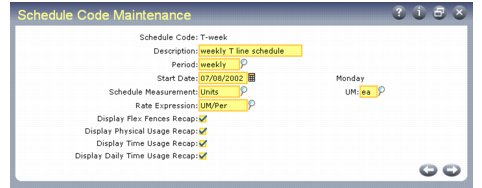
Schedule Code Maintenance (17.21.1.19)
Schedule Code
Enter an alphanumeric code representing this set of schedule information. This can be up to eight characters.
Description
Optionally enter an alphanumeric description (24 characters) of this flow schedule code. This field is for reference and displays in other programs when you reference the schedule code.
Period
Enter the scheduling period associated with this schedule code. This value must already be defined in Planning Period Maintenance (17.21.1.1).
When you reference this schedule code in Flow Schedule Maintenance, the system uses the associated period information from Planning Period Maintenance in date calculations. It is also used to determine date displays in some reports and inquiries.
Start Date
Enter the starting date for flow schedules that use this code.
This field cannot be blank. When you enter a date, the system displays the day of the week next to the field.
Flow scheduling functions throughout the system use this value to verify that schedule dates are accurate. For example, you cannot enter a due date in Flow Schedule Maintenance using this schedule code if it is earlier than this date.
Schedule Measurement
Enter the type of measurement associated with flow schedules that use this code. Valid values are:
• Units
• Weight
• Volume
If you enter Weight or Volume, you must enter a valid weight or volume unit of measure in the UM field. UM is optional if you enter Units.
The system uses this setting together with the value of UM when it performs physical and time usage calculations for flow schedules referencing this code. When a unit of measure is specified, all items on the flow schedule are converted to that UM. If Schedule Measurement is Units and UM is blank, the system uses the stocking UM of all items on the schedule and combines them, even if the values are different. For example, it would combine one of a unit defined as EA (each) with one of a unit defined as DZ (dozen) for a total of two, even though the actual physical number of items is 13.
UM
Enter the unit of measure associated with flow schedules that reference this code.
When Schedule Measurement is Units, you can leave this field blank or specify a valid UM. When Schedule Measurement is Weight or Volume, a valid UM is required.
Rate Expression
Specify the method used to express the flow rate of a production line that references this schedule code. Valid values are:
• UM/Per: Number of UMs made in one period
• UM/Hours: Number of UMs made in one hour
• UM/Day: Number of UMs made in one day
• Per/UM: Periods required to make one UM
• Hours/UM: Hours required to make one UM
• Day/UM: Days required to make one UM
The first three options express flow rate in terms of the production output per period of time. The other three define the rate in terms of Takt time—the rate at which parts must be manufactured to satisfy demand.
The following fields control the display of flow schedule data when schedules are entered in Flow Schedule Maintenance (17.21.3).
Display Flex Fences Recap
Specify whether Flow Schedule Maintenance displays the Flex Fences Data frame after you complete data entry on schedules that reference this code. The system also displays a warning message if the scheduled quantity for the period is outside the flex fence parameters.
Regardless of the value of this field, the system calculates and displays flex fence information only if records have been set up for the production line in Flex Fence Maintenance (17.21.1.10).
Display Physical Usage Recap
Specify whether Flow Schedule Maintenance displays the Physical Usage frame after you complete data entry on schedules that reference this code.
Physical usage is expressed as the percentage of the maximum production rate and target production rate represented by actual production for the period.
Display Time Usage Recap
Specify whether Flow Schedule Maintenance displays the Time Usage frame after you complete data entry on schedules that reference this code. When this field is Yes, the system displays time usage data for all flow rate codes associated with the site, production line, and schedule code.
Time usage is expressed as the percentage of the available hours for a given flow rate represented by the hours used in the schedule.
Display Daily Time Usage Recap
Specify whether Flow Schedule Maintenance displays the Time Usage by Day frame after you complete data entry on schedules that reference this code.
Time usage by day is expressed as the percentage of the available hours for each day represented by the hours used on that day.
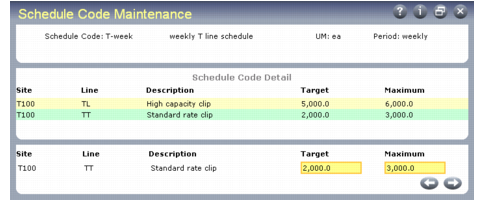
Optionally, you can use this program to associate target and maximum production rates with specified sites and production lines that use this schedule code. When you complete basic data entry in the first frame and press Go, the system prompts you to modify schedule code detail. Specify Yes to access another data entry frame for entering flow rates.
Note: You can also enter flow rates for schedule codes in Production Line Maintenance.
Schedule Code Maintenance, Schedule Code Detail Frames
Target
Enter the optimum number of units produced by this line during the schedule period when it uses this schedule code.
This cannot be greater than the value entered in Maximum.
Maximum
Enter the absolute maximum number of units produced by this line during the schedule period when it uses this schedule code.
This cannot be smaller than the value entered in Target.
Note: Flow Schedule Maintenance uses these quantities to calculate physical usage.