Defining Flex Fences
Use Flex Fence Maintenance (17.21.1.10) to define flex fence parameters for flow schedules.
Flex fences are tools for determining if the total schedule being entered or maintained is within a realistic, specified variance from the current period’s total schedule. This lets you verify that schedules are maintaining a reasonably constant level of production over several periods, or warns you of large changes in production requirements in an upcoming period.
When you set up flex fence parameters and Display Flex Fence Recap is Yes in Schedule Code Maintenance for the code specified on the flow schedule header, the system displays two kinds of flex fence data after you complete data entry in Flow Schedule Maintenance:
• A summary frame of flex fence data
• A warning message when the variance for a period on the schedule is outside the specified percentage
Note: When the system does not find flex fence parameters for the production line and schedule code, the flex fence recap frame and warning messages do not display regardless of the setting of Display Flex Fence Recap.
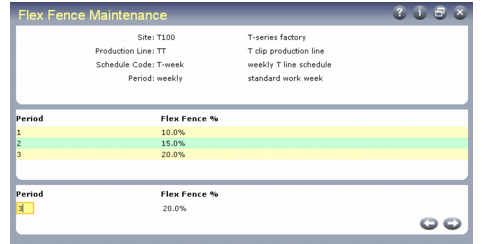
In the first frame, enter the combination of site, production line, and schedule code associated with the flex fence parameters. When you enter a schedule code, the system displays the period associated with the code in Schedule Code Maintenance.
Flex Fence Maintenance (17.21.1.10)
You can apply flex fences more generally by leaving one of the first three fields in the program blank. For example, if you leave Production Line blank, the flex fence parameters apply to all flow orders that specify this combination of site and schedule code, regardless of the production line.
Note: Only one of the three fields can be blank.
In the center frame, the system displays any existing flex fence values. Use the bottom frame to edit existing flex fence periods or define new ones.
Period
Enter the relative number of the period for which the system will use the specified percentage in flex fence calculations.
This period is relative to the current date. For example, when you are using weekly schedules, period 1 covers the schedule for the week immediately following this one.
To determine the period in which the schedule being maintained falls, the system:
• Reads all existing flow schedule master records backwards, beginning with the one being maintained.
• Counts the number of records read with the appropriate site and production line until it finds the one that includes today’s date. This is the number the system uses as a period to select a flex fence percentage.
Numbers in this field do not have to be consecutive. If there is a gap in the sequence, the system uses the value for the previous period until it reaches the next specified period. For example, if you have percentages defined only for periods 1 and 4 and you are entering a schedule for what the system calculates to be period 3, it will continue to use flex fence parameters specified for period 1 until you maintain the schedule for period 4.
Flex Fence Percentage
Enter the percentage the system should use in comparing a production line’s resource usage for the period being maintained with a baseline period. For example, if you enter 5, the system measures whether calculated usage is within –5 or +5 percent of the baseline period’s scheduled usage.
Typically, flex fence percentages increase over time. If you enter a percentage that is less than a previous period’s value, the system displays a warning. You can disregard this message.
When you access a schedule in Flow Schedule Maintenance, the system obtains the total schedule usage from the schedule that includes today’s date. This is the baseline value used in the flex fence calculation. It then determines the period for the schedule being maintained and uses the associated percentage to calculate minimum and maximum values. If the current schedule’s resource usage is outside that range, the system displays a warning message.
Use of Flex Fences
When you enter a flow schedule in Flow Schedule Maintenance for a period after the current one, the system searches for flex fence records in the following order:
1 One that matches site, production line, and schedule code
2 One that matches site and production line, with a blank schedule code
3 One that matches site and schedule code, with a blank production line
4 One that matches production line and schedule code, with a blank site
When it finds a match, the system calculates which period applies to the future schedule being maintained, using the current period as 0. It then uses the associated percentage to calculate flex fence variances for that future schedule based on the scheduled quantity for the current period.
Note: All flex fence calculations are based on comparisons between future periods and the current period. When you enter schedules for the current period, flex fence parameters are not applicable.
If the variance is not within the specified percentage, the system displays a warning message.