Defining Flow Rate Codes
In addition to the standard target and maximum production rates you can associate with a production line in either Production Line Maintenance or Schedule Code Maintenance, you can also optionally define flow rate codes that can then be associated with numeric flow rates in two ways:
• For specific items using Rate Code by Item Maintenance (17.21.1.13)
• For item types or groups using Rate Code by Type/Group Maintenance (17.21.1.16)
Flow rate codes let you measure physical and time usage in a schedule. You can check to see if the total production output or hours in a new schedule do not exceed production capacity.
Before setting up flow rate data, you must first define flow rate codes in Generalized Codes Maintenance (36.2.13) for field flcr_rate_code.
When you enter or maintain flow schedules using Flow Schedule Maintenance (17.21.3) for items that have flow rates defined, the system displays resource usage data based on different scenarios.
Flow Rate Codes for Items
Use Rate Code by Item Maintenance (17.21.1.13) to associate optional flow rate codes with numeric production rates for specific items on a production line.
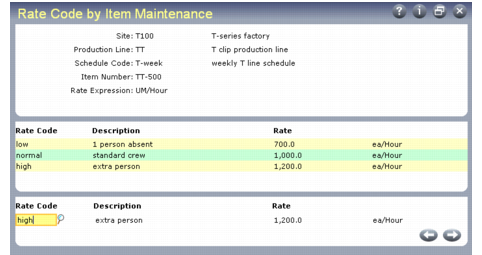
In the first frame, enter the combination of site, production line, schedule code, and item number to which the flow rate codes apply. The system displays the rate expression associated with the code in Schedule Code Maintenance.
You can apply flow rate codes more generally by leaving either Site, Production Line, or Item Number blank. (Only one of the three fields can be blank.) For example, if you leave Production Line blank, the flow rate codes apply to all flow orders that specify this combination of site, schedule code, and item number regardless of the production line being used.
Note: Schedule Code is always required because the system uses it to determine the rate expression that applies to flow rates.
The system validates unit of measure (UM) conversions for the item if you enter a value in Schedule Code that has a schedule UM specified in Schedule Code Maintenance. In this case, a UM conversion record must already be set up in Unit of Measure Maintenance between the schedule UM and the item’s stocking UM. Otherwise, the system displays an error.
Rate Code by Item Maintenance (17.21.1.13)
The center frame displays existing flow rate code records, if any have been defined. Records are listed in ascending numeric sequence based on the rate, rather than by flow rate code. Use the bottom frame to edit existing flow rate records or enter new ones.
Rate Code
Enter the flow rate code for this item. Values are validated against codes entered in Generalized Codes Maintenance for field flcr_rate_code. The system displays the description associated with the generalized code.
In Flow Schedule Maintenance, flow rate codes are associated with a specific production rate on a specific production line. When Display Time Usage Recap is Yes in Schedule Code Maintenance for the schedule code specified in the flow schedule header, the system displays time usage data for each flow rate code defined for items on the production line.
Rate
Enter the production rate represented by this flow rate code when it is used with the specified item. When Display Time Usage Recap is Yes for the schedule code on a schedule being entered in Flow Schedule Maintenance, the system displays time usage data based on this rate.
Important: This rate should be in terms of the displayed rate expression, which is associated with the schedule code specified in the first frame. For example, if the rate expression is units/hour, you might enter a flow rate of 100. However, the same rate for a rate expression of hours/unit would be 0.01.
Flow Rate Codes for Item Types or Groups
Use Rate Code by Type/Group Maintenance (17.21.1.16) to specify production line flow rate data unique to item types or groups. Items are optionally associated with types or groups in one of the following programs:
• Item Master Maintenance (1.4.1)
• Item Data Maintenance (1.4.3)
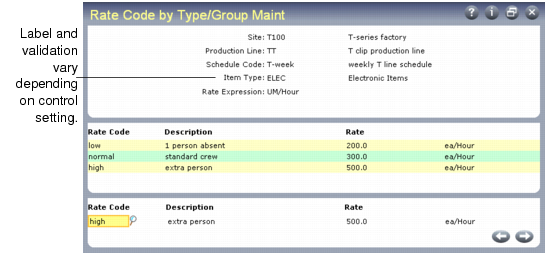
This program is very similar to Rate Code by Item Maintenance. However, instead of specifying an individual item, you can apply the defined flow rates to item types or groups.
Rate Code by Type/Group Maintenance (17.21.1.16)
Indicate how you want to apply these rates in the Enter Flow Rate Code by Item Type/Group field in Flow Control (17.21.24). The field label and generalized codes validation in Rate Code by Type/Group Maintenance change based on that setting, as shown in
Effects of Flow Control Setting.
Effects of Flow Control Setting
Flow Control Value | Field Label | Generalized Codes Validation |
Type | Item Type | pt_part_type |
Group | Item Group | pt_group |
Use of Flow Rate Records
Flow Schedule Maintenance uses the following search sequence to determine which flow rate record to use in its calculations:
1 Search for the specific site, production line, schedule code, and item number (from Rate Code by Item Maintenance).
2 Search for specific site, production line, schedule code, and item type or group associated with the item number entered (from Rate Code by Type/Group Maintenance).
3 Search for specific site, production line, schedule code and a blank item number (from Rate Code by Item Maintenance).
4 Search for specific site, blank production line, schedule code, and item number (from Rate Code by Item Maintenance).
5 Search for blank site, production line, schedule code, and item number (from Rate Code by Item Maintenance).