Linking Work Centers to Locations
Optionally, you can set up a link between a flow production line work center and the location from which it backflushes components used to produce items on flow scheduled orders. By associating one or more locations with a work center and specifying a preference value for each, you can control the order in which the system selects backflush locations when you receive a flow scheduled order into inventory.
Use Work Center/Location Maintenance (17.21.1.22) to set up these links.
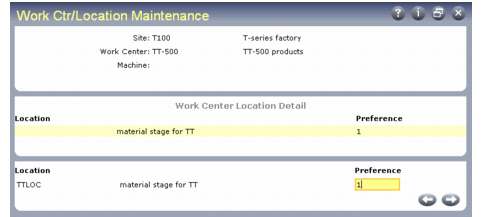
In the first frame, enter the combination of site, work center, and machine that will backflush components from the specified locations. You must enter at least a valid Work Center. To create more general records, you can leave Site or Machine blank.
Work Center/Location Maintenance (17.21.1.22)
The center frame displays existing flow rate code records, if any have been defined. Use the bottom frame to edit existing records or enter new ones. If this work center consumes components from more than one location, you can enter multiple locations. Use the Preference field to specify the priority the system should use in backflushing required components from each location.
Use of Work Center/Location Records
When you record completions using Flow Schedule Receipts and Modify Backflush is set to No, the system uses the following sequence to find locations that can provide the total quantity of components used by the completed flow schedules.
1 Based on the routing, use locations associated with a specified site, work center, and machine code.
2 Based on the routing, use locations associated with a specified site, specified work center, and blank machine code.
3 Based on the routing, use locations associated with a blank site, specified work center, and specified machine code.
4 Based on the routing, use locations associated with a specified work center only.
5 Based on item master data, use the location associated with the item.
6 Use blank location.
If a matching record has more than one location specified, the system consumes components in the order specified in Preference. When locations in one record do not provide sufficient components for the entire quantity received, the system consumes available components and searches for another appropriate location.
If backflush requirements still are not met, the system displays a warning message and a data-entry frame for the backflush location.