Importing MRP Planned Orders to a Flow Schedule
Use Import MRP Orders to Schedule (17.21.9) to select planned work orders for specified items and add them to flow schedules for the appropriate production lines.
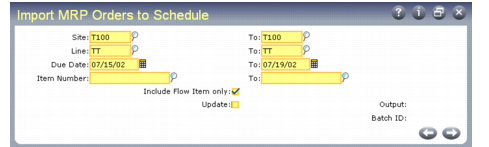
Import MRP Orders to Schedule (17.21.9)
Enter selection criteria for the items that will have planned orders added to flow schedules. To limit the selection to items that are usually produced on a flow line, set Include Flow Items Only to Yes. Set Update to No to review a report on the effects of running this program before updating the database.
When you press Go, the system looks for MRP-planned (status P) work orders for the items matching the selection criteria. If the item is not assigned to a production line in Production Line Item Maintenance, it is skipped. If it is assigned to multiple production lines, the system uses the Preference value from Production Line Item Maintenance to determine the production line where the order will be scheduled.
Based on the planned order due date, the system assigns each work order to the production line flow schedule for the appropriate period. If a schedule already exists for that date, the system assigns the next available sequence number. After importing the orders to flow schedules, you can update sequence and date information using Flow Schedule Maintenance.
If the item on an imported schedule has a purchase/manufacture code of W (flow), the system changes the work order type to W. Otherwise, the work order type is left blank. In either case, the system sets the work order status to E (exploded). It then follows standard work order processing: Bill of material (BOM) and routing records are created based on item master data, and the product structure is re-exploded using the latest BOM and routing information available. The release date is calculated based on the due date.
After importing MRP planned orders to flow schedules, process them the same way you do other flow scheduled orders.