Setting Up Production Lines
A production line is defined at a site by specifying the hourly production rate for items produced on that line during a normal shift. One or more items can be made on the same production line, and the same item can be produced on several production lines, all at the same or at different production rates.
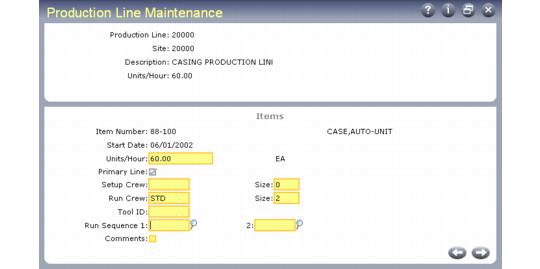
Production Line Maintenance (18.22.1.1)
When an item is produced on one line only, this line can be assigned a primary line status for that item. A primary line produces all orders for an item. To indicate a primary line, set the Primary Line field to Yes. Optionally, orders for an item can be allocated to several different production lines. To set up multiple production lines for an item, set the Primary Line field to No and use Line Allocation Maintenance (18.22.1.11) to set the percent of an item’s production for each line.
The production rate for an item on a production line is equal to that of the operation with the lowest production rate. A production line is no faster than its slowest operation.
Production rates can vary by shift or day. You can adjust the basic production rate for an item by changing the rate factor in the Productivity field in Shift Maintenance (18.22.1.22).
Use the effective date associated with the production rate to indicate changes in a line when items are phased in or out of production or when rates increase or decrease at a certain date.
Run sequence fields can be used to control the sequence in which planned orders for line-manufactured items are added to a production line schedule.
When Sort by Run Sequence is Yes in Planned Repetitive Sched Approve (23.8), approved orders are sorted and sequenced in production line schedules using the following hierarchy:
• Due date
• Primary run sequence
• Secondary run sequence
• Item number