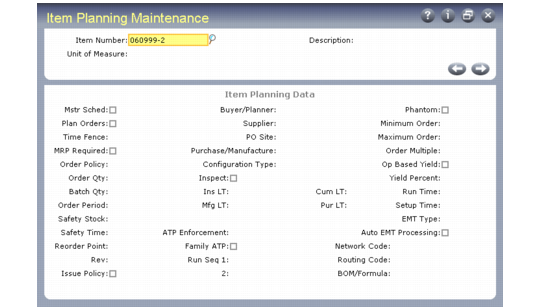
Production Sequence | Item Number | Primary Run Sequence | Secondary Run Sequence |
1 | 300 | 01Plastic | 01White |
2 | 200 | 01Plastic | 02Green |
3 | 100 | 02Plastic | 02Green |
Order Policy | Description |
Period order quantity (POQ) | MRP calculates demand for this item over the number of calendar days specified as the Order Period and creates one order to satisfy this demand. |
Fixed order quantity (FOQ) | MRP generates planned orders for the quantity specified as the Order Quantity. If the quantity required exceeds this quantity, multiple orders are generated. If the quantity in the Min Ord field is greater than the specified order quantity, planned orders are generated for this minimum quantity. |
Lot-for-lot (LFL) | MRP generates a separate planned order to satisfy each net requirement. If there are many sources of demand, MRP creates many planned orders. When LFL policies are used across multiple product levels, running MRP may produce unmanageable numbers of manufacturing orders. |
One time only (OTO) | MRP generates a single planned order with a quantity of one unit. As long as one order for this item exists, the system will not create another. OTO can be used for prototype items, or for planning project activities and one-time events. |
Order Modifier | Description |
Order Quantity | The quantity for which all MRP planned orders are created for an item with an order policy of FOQ. |
Safety Stock | The quantity of this item maintained in inventory as protection against fluctuations in demand or supply. MRP processing considers safety stock a requirement, and schedules planned orders to cover this requirement. You should not designate safety stock levels for non-master scheduled items because it may cause MRP to overplan inventory. |
Minimum Order Quantity | The minimum quantity allowed for a planned order. If the net requirement is below this amount, MRP creates an order for this minimum quantity. To ensure that items that have decimal demand values due to yield or scrap calculations are ordered in whole number quantities, set this value to 1, or to any whole number. |
Maximum Order Quantity | When a net requirement exceeds this amount, MRP generates the action message Order Exceeds Maximum for the order created to fill this requirement. |
Order Multiple | When order policy is POQ or LFL, planned orders are created in multiples of this quantity. For example, if the order multiple is 100, planned orders are only created for quantities of 100, 200, 300, and so on. |
Yield % | The percentage of an order expected to be in usable condition. If Yield % is less than 100%, MRP plans orders for more than needed. For example, if the net requirement is 100 and the item Yield % is 50%, then the planned order quantity will be 200. You can enter this value manually or use Routing Cost Roll-Up (14.13.13) to calculate yield percent based on the yield percentages at each operation in the item routing. • If operation-based yield is No, MRP uses this yield percentage amount to calculate component requirements. • If operation-based yield is Yes, the yield percentage for components is derived from the parent item’s routing data. The item yield percentage is ignored. If an item’s yield percentage is less than 100 percent, MRP may generate planned orders for fractional quantities. To prevent this, set Order Minimum or Order Multiple to 1, or any whole number. |
Scrap % | The percentage of a component item expected to be scrapped during manufacture of the parent item.This value increases the component requirements for planned orders for that component-parent pair. Specify scrap % values for components in Product Structure Maintenance (13.5). When scrap percentage is greater than zero, MRP may calculate fractional component quantities, even if the component is a discrete item. For example, if one housing is required to build an item and the scrap factor is 5%, the system will calculate a requirement for 105.2631 housings to make 100 units. To prevent MRP from generating planned orders for fractional quantities, set Order Minimum or Order Multiple to 1, or any whole number. |
Lead Time | Description |
Manufacturing Lead Time | The number of working days it takes to manufacture an item, including the time it takes to process paperwork, issue components, inspect the finished product, and receive it into stock. For DRP items, enter DRP transit and order time in this field so that this value is included in the cumulative lead time for this item. |
Purchasing Lead Time | The number of calendar days it takes to complete a purchasing cycle for an item, from the date the need for a purchase is recognized to the date the item is received. |
Inspection Lead Time | The number of working days it takes to inspect a purchased item after it is received. |
Safety Lead Time | The number of working days early that MRP plans to receive orders for an item, to allow for late deliveries. |
Cumulative Lead Time | The longest number of calendar days it takes to obtain an item, assuming that neither it nor any of its components are in stock. The system calculates this value, by converting manufacturing, inspection, and safety lead time to calendar days. |