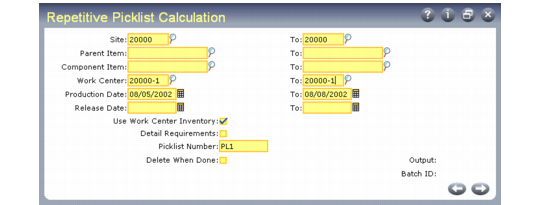
Calculate the Picklist
Calculate the picklist and create detail allocations using Repetitive Picklist Calculation (18.22.3.1). The calculation considers component requirements from the exploded repetitive schedules that match the sites, items, work centers, and production dates specified.
Repetitive Picklist Calculation (18.22.3.1)
For a new schedule creating requirements at a work center with no shortages, Repetitive Picklist Calculation uses the following equation.
Shortage at Work Center = New Requirements – Net Available
Where net available equals:
Actual OH – Qty Alloc – Qty Req by Other Scheds + Untransferred Picked
The Net Available is the material available for these requirements at the work center, consisting of the material already there (Actual OH) and the material to be transferred (Untransferred Picked) minus the existing requirements. The existing requirements consist of the Qty Req by Other Scheds and the quantity allocated at that work center to work orders or sales orders (Qty Alloc).
Note: When Use Work Center Inventory is No, on-hand inventory and quantities from untransferred picklists are not considered in the calculation.
As the equation shows, the picklist supplies material for the work center, not individual schedules. You can ensure that picklists supply individual schedules by running the picklist calculation immediately after exploding each new schedule. The picklist calculation already considers all existing picklists, so the new picklist will only meet the new requirements.
Choosing Options
Repetitive Picklist Calculation offers several options to control the picklist calculation.
Use Work Center Inventory
When Yes, the system counts inventory in a work center, as well as quantities from untransferred picklists, as inventory.
Use Order Multiple
When Yes, the system determines the number of items to be transferred (quantity required) and then rounds that number up based on the order multiple defined in Item Master Maintenance (1.4.1), Item Planning Maintenance (1.4.7), or Item-Site Planning Maintenance (1.4.17).
When No, the exact quantity required prints on the picklist and no rounding is applied by the system. Set this field to No when you are using lean manufacturing techniques and do not want any extra items on the shop floor.
Detail Requirements
When Yes, the system prints all repetitive schedules generating requirements for a component, including the quantity required, parent item, due and start dates, machine, and operation.
Delete When Done
When Yes, the picklist is automatically deleted after the calculation. Use this option to review shortages without actually allocating inventory. The Next Picklist field in Repetitive Control (18.22.24) is not incremented.
Troubleshooting Problems
If problems occur with the picklist calculation, remember the following:
• A location must be created with the same name as the work center.
• The calculation does not create a picklist if there is no inventory to detail allocate. You cannot allocate negative quantities. The system does not warn you if inventory is insufficient to meet the requirements—it just does not create a picklist.
• The system does not create a picklist if there is sufficient inventory at the work center.
• Detail allocations are not associated with specific orders, so no order IDs are shown in the allocated inventory inquiry.
• The schedule treats all existing picklists as supply. To recalculate total requirements at a work center, delete all untransferred picklists. A picklist remains open until deleted or inventory is transferred, even if the schedule changes.
• The picklist calculation blows through phantoms. There is no phantom use-up logic.
• The picklist does not calculate requirements by shift.
• Since the calculation is based on requirements from an exploded repetitive schedule, it is not affected by changes in structures or routings.
• You can further control the quantities on a picklist using the item-site planning parameters Order Maximum and Order.